Introduction
The ISARA Radiate Quantum-Safe Library gives you the cryptographic building blocks to create applications that will resist attacks by quantum computers.
For more information about ISARA and our quantum-safe solutions, visit www.isara.com.
This Developer’s Guide tells you how to do things with the library, such as:
-
use ML-DSA (Module-Lattice-Based Digital Signature Algorithm) signature scheme for digital signatures
-
use ML-KEM (Module-Lattice-based Key Encapsulation Mechanism) for key encapsulation
-
provide your own implementations of generic algorithms, such as hashes
The library’s API is designed around generic algorithms; you create an instance
of the algorithm you want (say, SHA2-256) and then use it with the generic
algorithm APIs (iqr_HashBegin(), iqr_HashUpdate(), and iqr_HashEnd()).
Things like signature schemes and key encapsulation mechanisms are specialized enough to require their own APIs.
We recommend that you have a good understanding of cryptography and the theory of security protocols.
The Developer’s Guide covers the following topics:
-
Getting Started — Foundational information for using the library
-
Hashes — How to use the library’s SHA2, and SHA3 implementations, and how to provide your own implementations
-
Random Numbers — How to generate pseudorandom bytes
-
Message Authentication Codes — How to use the HMAC and Poly1305 MACs
-
Key Derivation Functions — How to use the KDFs
-
Symmetric Encryption — How to use the ChaCha20 symmetric encryption algorithm
-
Digital Signatures — How to use the ML-DSA, LMS, and XMSS digital signature schemes
-
Key Encapsulation Mechanisms — How to use the ML-KEM key encapsulation mechanisms
-
Technical Info — Detailed information about the compiler options we’ve used, how to maximize code stripping when using the static library, and other details that might be helpful
-
Building On Windows — How to use the library on the Windows platform
Classical and Quantum Security
Cryptographic algorithms are often described as providing "x bits of security" when used with a certain set of parameters. These parameters can be tuned to provide additional security, usually at the cost of additional CPU and/or memory usage.
These x bits of security apply to an adversary equipped with classical, non-quantum computers, and will appear as "x bits of classical security" in the library’s documentation. The strength of an algorithm against attacks by quantum computers will be written as "x bits of quantum security."
Some classes of algorithm, such as encryption schemes based on the discrete log problem, are thought to be easily breakable by adversaries equipped with quantum computers.
Some algorithms, such as cryptographic hashes and symmetric encryption schemes, are not known or believed to be efficiently breakable by a quantum adversary. Their quantum security strength is generally considered to be half of their classical strength. For example, AES-256 provides 256 bit classical security, and 128 bit quantum security.
Packaging
The library archive contains the following files and directories:
-
README.html— Information about the library package -
SECURITY.html— Information about reporting security issues, and ISARA’s PGP public key -
doc— API documentation and this Developer’s Guide document -
include— Library headers -
lib— Library static and shared libraries optimized for your platform -
samples— Sample programs demonstrating how to use the library
Cryptographic signatures for the installation archives are distributed with the archives. If you don’t have access to the signatures, contact support@isara.com.
Getting Help
The latest version of the library documentation is available on the ISARA website. You can also request support via email.
-
1-877-319-8576 Toll-free (Please refer to your support contract.)
Reporting Security Issues
The ISARA team takes security bugs in the library seriously. We appreciate your efforts to responsibly disclose your findings, and will make every effort to acknowledge your contributions.
To report a security issue, email security@isara.com and include the word "SECURITY" in the subject line.
The ISARA team will send a response indicating the next steps in handling your report. After the initial reply to your report, the team will keep you informed of the progress towards a fix and full announcement, and may ask for additional information or guidance.
ISARA’s PGP Key
If you need to validate signatures on files coming from ISARA, or you want to encrypt a file you’re sending to us, you can grab our PGP public key from https://www.isara.com/public_key.asc.
It has the following digests:
| Algorithm | Digest |
|---|---|
SHA1 |
|
SHA2-256 |
|
SHA2-512 |
|
Samples
The samples directory has a number of sub-directories, each with a
self-contained program inside demonstrating how to use the library for a
specific purpose:
Quantum-Safe Signature Schemes:
-
mldsa— Generate keys, sign a file’s data, and verify a signature using ML-DSA -
lms— Generate keys, sign a file’s data, and verify a signature using LMS -
xmss— Generate keys, sign a file’s data, and verify a signature using XMSS
Quantum-Safe Key Encapsulation Mechanisms:
-
mlkem— Encapsulate and decapsulate a generated shared key using ML-KEM
Classical Cryptographic Algorithms:
-
aead_chacha20_poly1305— Encrypt/decrypt using ChaCha20/Poly1305 for authenticated encryption -
chacha20— Encrypt/decrypt using ChaCha20 -
hash— Hash a file’s data using SHA2-256, SHA2-384, SHA2-512, SHA3-256, or SHA3-512 -
kdf— Derive a key (some pseudorandom data) using the specified key derivation function -
mac— Generate a message authentication code using the specified MAC algorithm -
rng— Generate pseudorandom bytes using HMAC-DRBG
Tools and Utilities:
-
common— A small library of functions common to the samples -
integration— Integrating the library with other software -
version— Display the library’s version information -
VisualStudio— Visual Studio solution and project files
The integration directory has samples showing how to integrate external
implementations with the library. These samples may have external dependencies
on specific software such as OpenSSL, or specific operating system features such
as having a /dev/urandom device available.
-
integration/hash-openssl— Use OpenSSL’s SHA2-256, SHA2-512, SHA3-256, and SHA3-512 with the library’s hash API -
integration/rng-cng— Use the Windows Cryptography API: Next Generation (CNG) with the library’s random number generator API -
integration/rng-urandom— Use/dev/urandomwith the library’s random number generator API
To compile the samples, you will need:
-
C99 compliant compiler; recent versions of
clangorgccare preferred -
cmake3.22 or newer -
GNU
make4.2 or newer (or some other build tool supported by your version ofcmake)
|
Note
|
Don’t build the samples on macOS using gcc 8, they will crash before main()
due to a problem with -fstack-protector-all. Use clang to produce Mac
binaries.
|
Set your IQR_LIBRARY_ROOT environment variable to the directory where you
unpacked the installation archive. The build will expect to find include and
lib inside the IQR_LIBRARY_ROOT directory.
Compile all of the samples with:
-
cdto thesamplesdirectory -
mkdir build -
cdto thebuilddirectory -
cmake .. -
make
Getting Started
This section gives you an overview of things you’ll need to know to effectively use the library.
Objects in the library follow a standard cycle:
-
Create object.
-
Do things with the object.
-
Destroy the object.
Some things, like hashes, use a generic API; all hashes use the same Begin(),
Update(), End() functions.
Even algorithms that don’t use a generic API will have functions that indicate
exactly what they do. For example, ML-DSA (a digital signature scheme) has
Sign() and Verify(), while ML-KEM (a key encapsulation mechanism) has
Encapsulate() and Decapsulate().
How to Choose an Algorithm
The library has a number of algorithms and variants. You should pick an appropriate algorithm that meets your use case, and an appropriate variant that meets your requirements and constraints.
This series of questions will help guide you to the algorithm and variant you need.
Hashes, random number generators, MACs, and KDFs are all standard, well-known algorithms with specific well-known uses. The questions only cover quantum-safe algorithms.
What are you doing?
Your specific use case will determine your needs:
-
Encrypt data using a previously established secret key: you want symmetric encryption.
-
Securely agree on a secret key: you want key encapsulation.
-
Authenticate data: you want a digital signature.
Encrypting Data
If you’ve already got a secret key safely shared between two systems, use Symmetric Encryption to encrypt data. The library provides ChaCha20 for bulk encryption.
Agreeing on a Secret Key
Before deriving a secret key, you must establish a shared secret. Key Encapsulation Mechanisms (KEMs) do this securely.
Authenticating Data
To attain authenticity and integrity of data, you can use digital signature schemes to generate and verify digital signatures on data.
Compiling and Samples
After unpacking the library archive, you can start using it by adding the following command-line arguments to your compiler:
-I/path/to/isara_crypto_lib/include -L/path/to/isara_crypto_lib/lib -liqrcryptoTo build all of the samples at once:
cd /path/to/isara_crypto_lib/samples
mkdir build
cd build
cmake ..
make
To build a specific sample:
cd /path/to/isara_crypto_lib/samples/algorithm/sample_name
mkdir build
cd build
cmake ..
make|
Note
|
To build the samples, you’ll also need a recent version of cmake (version 3.22
or newer): https://cmake.org/ For most systems, you can use your platform’s
normal package tools to install it, but you may need to build an up-to-date
version. Binaries are also available on the CMake website.
|
The Context
To create objects and algorithms in the library, you need a Context. The
iqr_Context object keeps track of the registered hash algorithms as well as
additional internal information.
One Context object can be used to create as many other library objects as necessary. Use multiple Context objects if you need to provide several different hash implementations, for example.
The iqr_Context object and its APIs are defined in the iqr_context.h
header file. To create one:
#include "iqr_context.h"
...
iqr_Context *context = NULL;
iqr_retval result = iqr_CreateContext(&context);
if (result != IQR_OK) {
    // Examine "result" to see what error has occurred.
}
The library’s Create() functions all take a Context as their first argument.
To properly destroy the context:
#include "iqr_context.h"
...
// Create an iqr_Context object.
// Do crypto.
...
iqr_retval result = iqr_DestroyContext(&context);
if (result != IQR_OK) {
    // Examine "result" to see what error has occurred.
}
Standardized Return Values
All of the APIs in the library return an iqr_retval value, as defined in
the iqr_retval.h header.
On success, functions return IQR_OK; if an error occurs, the return value
will tell you why the error happened.
Use the iqr_StrError() function (also in iqr_retval.h) to convert an
iqr_retval value into an English string. Be sure to write your own error
messages if you need to support localization.
|
Note
|
Depending on your compiler flags, you must check the return values for library functions. |
Registering Hashes
Many algorithms require hash implementations. The Context supplies these, but doesn’t provide a default implementation. This reduces the size of the code in your application by only linking in the algorithms you actually need to use. It also lets you provide your own implementations for additional speed or security.
See the iqr_HashRegisterCallbacks() function in iqr_hash.h.
The library provides implementations of the quantum-safe SHA2 and SHA3 hash algorithms:
-
IQR_HASH_DEFAULT_SHA2_256- C implementation of SHA2-256 -
IQR_HASH_DEFAULT_SHA2_384- C implementation of SHA2-384 -
IQR_HASH_DEFAULT_SHA2_512- C implementation of SHA2-512 -
IQR_HASH_DEFAULT_SHA3_256- C implementation of SHA3-256 -
IQR_HASH_DEFAULT_SHA3_512- C implementation of SHA3-512
For example, to use the library implementation of SHA2-256:
#include "iqr_context.h"
#include "iqr_hash.h"
...
// Create an iqr_Context object.
...
iqr_retval result = iqr_HashRegisterCallbacks(context, IQR_HASHALGO_SHA2_256,
    &IQR_HASH_DEFAULT_SHA2_256);
if (result != IQR_OK) {
    // Examine "result" to see what error has occurred.
}
After this call to iqr_HashRegisterCallbacks() any library APIs that need a
SHA2-256 object can create one using the library’s built-in SHA2-256
implementation.
Registering a Watchdog
Some algorithms, such as LMS key generation, can take a long time to complete. In some cases, you might need to signal a supervising process (or a user) that the code is still working.
In iqr_watchdog.h the library provides a function for registering your own
callback function. This function is called periodically by long-running
algorithms. (See the API documentation for information about which algorithms
call the watchdog callback.)
|
Note
|
The watchdog function can be called frequently during key generation. Make your callback short and fast, with no blocking calls, so it doesn’t affect performance. |
Your watchdog function should look something like this:
#include "iqr_watchdog.h"
...
void my_watchdog_function(void *watchdog_data)
{
    // Notify a supervisor process or provide user feedback.
    ...
}
...
Then use iqr_WatchdogRegisterCallback() to register it:
#include "iqr_context.h"
#include "iqr_watchdog.h"
...
// Create an iqr_Context object.
...
iqr_retval result = iqr_WatchdogRegisterCallback(context, my_watchdog_function,
    my_data);
if (result != IQR_OK) {
    // Examine "result" to see what error has occurred.
}
After this call to iqr_WatchdogRegisterCallback() any library algorithm using
this context that invokes the watchdog will call my_watchdog_function(),
passing it the pointer my_data.
To remove your watchdog function, call iqr_WatchdogRegisterCallback() with
NULL as the function pointer:
#include "iqr_context.h"
#include "iqr_watchdog.h"
...
// Create an iqr_Context object.
...
iqr_retval result = iqr_WatchdogRegisterCallback(context, NULL, NULL);
if (result != IQR_OK) {
    // Examine "result" to see what error has occurred.
}
The data pointer is ignored when the function is set to NULL.
Thread Safety
Objects in the library are self-contained. Any data required to use the object is controlled by the library.
Access to the object is not managed by the library. To use library objects in a multi-threaded environment you’ll have to use the operating system’s mutexes or critical section guards carefully. Your use of the library is as thread-safe as you make it so the library can be as fast as possible in a single-threaded environment.
There are no global variables in the library. There are no data structures with
shared, static data.
Anything that can be accessed from several threads needs to be locked in a way
that makes sense for the object. For example, with a hash, you need to wrap
the entire iqr_HashBegin()/iqr_HashUpdate()/iqr_HashEnd() sequence (or
the call to iqr_HashMessage()). For an RNG you might only need to
lock iqr_RNGGetBytes() calls (but that gets more complex if you’re using one
that needs to be reseeded regularly).
Data Hygiene
Parameter objects (iqr_*Params) in the library never contain any
cryptographic material.
All objects in the library have their buffers wiped with 0x00 bytes prior
to being deallocated.
Buffers (seed data, hash inputs, etc.) passed to library functions are never modified by the library unless explicitly stated in API documentation.
Version Information
The iqr_version.h header gives you access to the library’s version numbers,
plus some identifying information about the build.
-
IQR_VERSION_MAJORandIQR_VERSION_MINORprovide the major and minor versions for the library. They can be combined asmajor.minorto produce a version string. -
IQR_VERSION_STRINGis a verbose version string for the library.
The iqr_VersionGetBuildTarget() function returns a string representation of
the target OS, target CPU architecture, and compiler used to build the library,
separated by / characters if you need to parse it into separate fields. Give
this information to ISARA’s support team if you discover something that looks
like a bug.
|
Note
|
The version sample is an easy way to get this information for ISARA’s support
team.
|
The iqr_VersionGetBuildHash() function returns a string representation of the
library’s build hash and build time stamp, separated by a / character if you
need to parse it into separate fields. Give this information to ISARA’s support
team if you discover something that looks like a bug.
There’s also an iqr_VersionCheck() function that you can use to ensure that
your headers match the version of the library you’re using:
#include "iqr_version.h"
...
iqr_retval result = iqr_VersionCheck(IQR_VERSION_MAJOR, IQR_VERSION_MINOR);
if (result == IQR_OK) {
    // Your headers and library are the same version.
    ...
} else {
    // Your headers and library come from different versions. Your code is
    // not likely to compile and/or link properly.
    ...
}
What Next?
These sections can be read in any order, depending on what you need to do:
-
To hash some data into a digest, see Hashes.
-
To generate random bytes, see Random Numbers.
-
To create message authentication codes from data, see MACs.
-
To derive secret key data, see KDFs.
-
To perform symmetric encryption using a shared secret, see Symmetric Encryption.
-
To digitally sign and verify messages, see Digital Signatures.
-
To generate a shared secret and encapsulate it for secure transport, see Key Encapsulation Mechanisms.
-
For detailed technical information about how the library was compiled, see Technical Info.
-
For information about building library projects with Visual Studio, see Building on Windows.
Hashes
Getting a hash digest for a message is a basic building block of many cryptographic algorithms. The library provides implementations of SHA2 and SHA3.
Registering Hashes
As mentioned in the Getting Started section, you must register an implementation. The library doesn’t automatically associate its own hashes with the Context when you create one. This makes it easier for code stripping to remove unused hash implementations from your application.
#include "iqr_context.h"
#include "iqr_hash.h"
...
// Create iqr_Context.
...
iqr_retval result = iqr_HashRegisterCallbacks(context, algorithm,
    implementation);
The library supports the following algorithms and provides the given implementations:
-
SHA2-256 (
IQR_HASHALGO_SHA2_256) —IQR_HASH_DEFAULT_SHA2_256 -
SHA2-384 (
IQR_HASHALGO_SHA2_384) —IQR_HASH_DEFAULT_SHA2_384 -
SHA2-512 (
IQR_HASHALGO_SHA2_512) —IQR_HASH_DEFAULT_SHA2_512 -
SHA3-256 (
IQR_HASHALGO_SHA3_256) —IQR_HASH_DEFAULT_SHA3_256 -
SHA3-512 (
IQR_HASHALGO_SHA3_512) —IQR_HASH_DEFAULT_SHA3_512
For example, to use the library’s SHA3-512 implementation as the default for all SHA3-512 hashes:
#include "iqr_hash.h"
...
// Create iqr_Context.
...
iqr_retval result = iqr_HashRegisterCallbacks(context, IQR_HASHALGO_SHA3_512,
&IQR_HASH_DEFAULT_SHA3_512);|
Note
|
The iqr_Context object tracks all of the supported SHA2 and SHA3
algorithms; you can register implementations for all of them on a single
iqr_Context.
|
When you register a hash implementation, the library runs a known-answer test
using the supplied hash callbacks. If this test fails, the registration is
ignored and iqr_HashRegisterCallbacks() returns an error.
Using Hashes
After an appropriate hash has been registered, you can use it with the generic hash API. This API is the same for all hashes.
To create a hash object:
#include "iqr_hash.h"
...
// Create iqr_Context.
// Register hash implementations.
...
iqr_Hash *hash = NULL;
iqr_retval result = iqr_HashCreate(context, hash_algorithm, &hash);
if (result != IQR_OK) {
    // Handle error.
}
To use a hash object:
...
// Call Begin() to initialize the hash.
result = iqr_HashBegin(hash);
if (result != IQR_OK) {
    // Handle error.
}

// Call Update() zero or more times to add data to the hash.
result = iqr_HashUpdate(hash, buffer, buffer_size);
if (result != IQR_OK) {
    // Handle error.
}

// Use iqr_HashGetDigestSize() to get the digest size for this hash.
uint8_t *digest = NULL;
size_t digest_size = 0;
result = iqr_HashGetDigestSize(hash, &digest_size);
if (result != IQR_OK) {
    // Handle error.
}

digest = calloc(1, digest_size);
if (digest == NULL) {
    // Handle out-of-memory.
}

// Call End() to finish the operation and get the digest.
result = iqr_HashEnd(hash, digest, digest_size);
if (result != IQR_OK) {
    // Handle error.
}
To destroy a hash object:
...
result = iqr_HashDestroy(&hash);
if (result != IQR_OK) {
    // Handle error.
}
There’s also an iqr_HashMessage() function that combines the
iqr_HashBegin(), iqr_HashUpdate(), and iqr_HashEnd() process into one
call:
...
result = iqr_HashMessage(hash, buffer, buffer_size, digest, digest_size);
if (result != IQR_OK) {
    // Handle error.
}
Writing a Hash Implementation
Because the library doesn’t have a default hash implementation associated with
the iqr_Context object, you can use the iqr_HashCallbacks structure (from
iqr_hash.h) to provide your own code. This is handy if you have hardware
that provides fast hashing, or you want to use another library’s implementation.
The iqr_HashCallbacks structure shows you the signatures of the functions
you’ll need to implement:
typedef struct {
    iqr_retval (*initialize)(void **state);

    void (*begin)(void *state);

    void (*update)(void *state, const uint8_t *buf, size_t buf_size);

    void (*end)(void *state, uint8_t *digest, size_t digest_size);

    void (*cleanup)(void **state);
} iqr_HashCallbacks;
The initialize() function is passed an empty pointer, where you can store
any necessary state. Allocate any memory you need.
#include "iqr_hash.h"
#include "iqr_retval.h"
...
iqr_retval myhash_initialize(void **state)
{
    // Sanity-check input.
    if (state == NULL) {
        return IQR_ENULLPTR;
    }

    if (*state != NULL) {
        return IQR_EINVPTR;
    }

    // Allocate whatever state you need. It's OK to leave it
    // NULL if you don't need to track any state.
    myhash_state *myhash = calloc(1, sizeof(myhash_state));
    if (myhash == NULL) {
        return IQR_ENOMEM;
    }
    ...
    *state = myhash;

    return IQR_OK;
}
Your begin() function is called at the start of a new hash operation.
Initialize your hash code, and get ready to accept data.
#include "iqr_hash.h"
#include <assert.h>
...
void myhash_begin(void *state)
{
    // Sanity-check input.
    assert(state != NULL);

    // Perform any other pre-hashing initialization.
    ...
}
The update() function is passed the state pointer, a buffer, and the size of
the buffer in bytes. Add the buffer’s data to your hash state. This function
can be called zero or more times during a hash operation.
void myhash_update(void *state, uint8_t *buf, size_t buf_size)
{
    // Sanity-check input.
    assert(state != NULL && buf != NULL && buf_size != 0);

    // Add the data from the buffer to your hash.
    ...
}
The end() function gets the state pointer, a buffer, and the size of the
buffer in bytes. Complete the hash operation and store its digest in the
supplied buffer.
void myhash_end(void *state, uint8_t *digest, size_t digest_size)
{
    // Sanity-check input.
    assert(state != NULL && digest != NULL);

    // Make sure there's enough room to store your digest.
    assert(digest_size == MYHASH_DIGEST_SIZE);

    // Finish processing the hash.
    ...

    // Extract the digest and store it in the given buffer.
    ...
}
Finally, the cleanup() function gets a pointer to the state pointer. Wipe and
deallocate any state you allocated during initialize() and set the state
pointer to NULL.
void myhash_cleanup(void **state)
{
    // Sanity-check input.
    assert(state != NULL);

    // Clean up and deallocate any state you allocated.
    //
    // You may need to substitute your platform's version of memset_s()
    // (a secure memset() that won't be optimized away by the compiler).
    ...
    memset_s(*state, 0, sizeof(myhash_state));
    free(*state);
    *state = NULL;
}|
Note
|
The end() function is always called when a hash object is destroyed,
whether or not begin() and update() succeeded.
|
Using OpenSSL’s SHA2-256
For a concrete example of creating your own hash implementation, let’s use OpenSSL’s SHA2-256.
First, we’ll write the hash’s initialize(), begin(), update(), end(),
and cleanup() functions using calls to the OpenSSL library:
#include "iqr_hash.h"
#include "iqr_retval.h"

#include <assert.h>
#include <openssl/evp.h>

// These OpenSSL APIs return 1 for success.
#define OPENSSL_OK 1

static iqr_retval sha2_256_initialize(void **state)
{
    // Sanity-check input.
    if (state == NULL) {
        return IQR_ENULLPTR;
    }

    if (*state != NULL) {
        return IQR_EINVPTR;
    }

    // Allocate an OpenSSL context to store the state.
    EVP_MD_CTX *ctx = EVP_MD_CTX_new();
    if (ctx == NULL) {
        return IQR_ENOMEM;
    }

    *state = ctx;

    return IQR_OK;
}

static void sha2_256_begin(void *state)
{
    // Sanity-check input.
    assert(state != NULL);

    EVP_MD_CTX *ctx = (EVP_MD_CTX *)state;

    // Let OpenSSL set up its context.
    int rc = EVP_DigestInit(ctx, EVP_sha256());
    assert(rc == OPENSSL_OK);
}

static void sha2_256_update(void *state, const uint8_t *buf, size_t buf_size)
{
    // Sanity-check input.
    assert(state != NULL && buf != NULL && buf_size != 0);

    EVP_MD_CTX *ctx = (EVP_MD_CTX *)state;

    // Pass the buf pointer into the OpenSSL update function.
    int rc = EVP_DigestUpdate(ctx, buf, buf_size);
    assert(rc == OPENSSL_OK);
}

static void sha2_256_end(void *state, uint8_t *digest, size_t digest_size)
{
    // Sanity-check input.
    assert(state != NULL && digest != NULL);

    // Make sure there's enough room to store your digest.
    assert(digest_size == IQR_SHA2_256_DIGEST_SIZE);

    EVP_MD_CTX *ctx = (EVP_MD_CTX *)state;

    // Pass the digest pointer into the OpenSSL final function.
    uint32_t return_size = digest_size;
    int rc = EVP_DigestFinal(ctx, digest, &return_size);
    assert(rc == OPENSSL_OK);
    assert(return_size == digest_size);
}

static void sha2_256_cleanup(void **state)
{
    // Sanity-check input.
    assert(state != NULL);

    EVP_MD_CTX *ctx = (EVP_MD_CTX *)*state;

    EVP_MD_CTX_free(ctx);
    *state = NULL;
}
Now that we’ve got an implementation, we need to register it so the rest of the library can use it when an algorithm needs a SHA2-256 hash:
// Create the callback structure.
static const iqr_HashCallbacks openssl_sha2_256 = {
    .initialize = sha2_256_initialize,
    .begin = sha2_256_begin,
    .update = sha2_256_update,
    .end = sha2_256_end,
    .cleanup = sha2_256_cleanup
};

// Register the OpenSSL implementation.
result = iqr_HashRegisterCallbacks(context, IQR_HASHALGO_SHA2_256,
    &openssl_sha2_256);
if (result != IQR_OK) {
    // Handle error.
}
After that, any IQR_HASHALGO_SHA2_256 hash object you create with that
iqr_Context object will use the OpenSSL implementation:
iqr_Hash *hash = NULL;
iqr_retval result = iqr_HashCreate(context, IQR_HASHALGO_SHA2_256, &hash);
if (result != IQR_OK) {
    // Handle error.
}
Using Microsoft’s SHA2-256
Windows 10 and newer operating systems feature Microsoft’s Cryptography API: Next Generation (CNG). This example demonstrates a SHA2-256 implementation that wraps Microsoft’s CNG functions. For more information, see the Creating a Reusable Hashing Object documentation.
The Windows API can return a number of error codes. In this example, we ignore
the NTSTATUS codes and replace them with our own iqr_retval codes. You must
handle NTSTATUS codes appropriately for your application.
First, we’ll write the hash’s initialize(), begin(), update(), end(),
and cleanup() functions:
#ifndef WIN32_LEAN_AND_MEAN
#define WIN32_LEAN_AND_MEAN  // Exclude rarely-used stuff from Windows headers.
#endif

#include <windows.h>
#include <bcrypt.h>
#include <ntstatus.h>

// This used to be in <ntstatus.h>, but was removed in recent versions of the
// Platform SDK.
#ifndef NT_SUCCESS
#define NT_SUCCESS(status) (status >= 0)
#endif

#include "iqr_hash.h"
#include "iqr_retval.h"

#include <assert.h>

// This will be our state.
typedef struct {
    BCRYPT_ALG_HANDLE alg;
    BCRYPT_HASH_HANDLE hash;
} BCRYPT_HANDLES;

static iqr_retval cng_sha2_256_initialize(void **state)
{
    // Sanity-check input.
    if (state == NULL) {
        return IQR_ENULLPTR;
    }

    if (*state != NULL) {
        return IQR_EINVPTR;
    }

    BCRYPT_HANDLES *handles = NULL;

    // Allocate the state that will be passed around.
    handles = calloc(1, sizeof(BCRYPT_HANDLES));
    if (handles == NULL) {
        return IQR_ENOMEM;
    }

    // A reusable hash object will automatically reset for reuse following a
    // call to BCryptFinishHash(). Thus it is not necessary to recreate a
    // hashing handle.
    DWORD flag = BCRYPT_HASH_REUSABLE_FLAG;

    NTSTATUS status = BCryptOpenAlgorithmProvider(&handles->alg,
        BCRYPT_SHA256_ALGORITHM, NULL, flag);
    if (NT_SUCCESS(status) == false) {
        goto cleanup;
    }

    status = BCryptCreateHash(handles->alg, &handles->hash, NULL, 0, NULL, 0,
        flag);
    if (NT_ERROR(status)) {
        goto cleanup;
    }

    // Success! Set the state and exit.
    *state = handles;

    return IQR_OK;

cleanup:
    BCryptCloseAlgorithmProvider(handles->alg, 0);
    free(handles);

    return IQR_ENOTINIT;
}

static void cng_sha2_256_begin(void *state)
{
    // A reusable hash object automatically resets its internal state.
    //
    // By reusing a hash object, this implementation favours speed by
    // utilizing more memory. An alternative implementation could call
    // BCryptCreateHash() here without the use of BCRYPT_HASH_REUSABLE_FLAG.
    return;
}

static void cng_sha2_256_update(void *state, const uint8_t *buf,
    size_t buf_size)
{
    // Sanity-check input.
    assert(state != NULL && buf != NULL && buf_size != 0);

    BCRYPT_HANDLES *handles = (BCRYPT_HANDLES *)state;

    NTSTATUS status = BCryptHashData(handles->hash, (PUCHAR)buf,
        (ULONG)buf_size, 0);
    assert(NT_SUCCESS(status) == true);
}

static void cng_sha2_256_end(void *state, uint8_t *digest, size_t digest_size)
{
    // Sanity-check input.
    assert(state != NULL && digest != NULL);

    // Make sure there's enough room to store your digest.
    assert(digest_size == IQR_SHA2_256_DIGEST_SIZE);

    BCRYPT_HANDLES *handles = (BCRYPT_HANDLES *)state;

    // The hash object automatically resets once this call succeeds.
    NTSTATUS status = BCryptFinishHash(handles->hash, (PUCHAR)digest,
        (ULONG)digest_size, 0);
    assert(NT_SUCCESS(status) == true);
}

static void cng_sha2_256_cleanup(void **state)
{
    // Sanity-check input.
    assert(state != NULL);

    BCRYPT_HANDLES *handles = (BCRYPT_HANDLES *)*state;

    NTSTATUS status = BCryptDestroyHash(handles->hash);
    assert(NT_SUCCESS(status) == true);

    status = BCryptCloseAlgorithmProvider(handles->alg, 0);
    assert(NT_SUCCESS(status) == true);

    memset_s(handles, 0, sizeof(*handles));
    free(handles);

    *state = NULL;
}
Now we use iqr_HashRegisterCallbacks() to register this implementation as
the SHA2-256 hash:
// Create the callback structure.
const iqr_HashCallbacks cng_sha2_256 = {
    .initialize = cng_sha2_256_initialize,
    .begin = cng_sha2_256_begin,
    .update = cng_sha2_256_update,
    .end = cng_sha2_256_end,
    .cleanup = cng_sha2_256_cleanup
};

// Register the CNG implementation.
result = iqr_HashRegisterCallbacks(context, IQR_HASHALGO_SHA2_256,
    &cng_sha2_256);
if (result != IQR_OK) {
    // Handle error.
}
Now, any IQR_HASHALGO_SHA2_256 hash object you create will use the
CNG SHA2-2 256 implementation:
iqr_Hash *hash = NULL;
iqr_retval result = iqr_HashCreate(context, IQR_HASHALGO_SHA2_256, &hash);
if (result != IQR_OK) {
    // Handle error.
}
Random Numbers
Generating random data is an important part of many cryptographic algorithms. The library supports the HMAC-DRBG algorithm for generating data.
For simplicity, we refer to this class of algorithm as random number generators (RNGs).
Seed Data
Pseudo-random number generators are only as good as the seed data you use to initialize them. This seed data must come from a good source of entropy.
Refer to your target system’s CPU or OS documentation to find the best source of entropy available to you.
Using a poor source of entropy data will compromise the randomness of the data produced by these algorithms.
|
Note
|
For NIST level V parameter sets, you must also use an RNG that also provides NIST level V security, such as HMAC-DRBG using SHA2-512 or SHA3-512. |
Using RNGs
Like hashes, RNGs use a generic API. Unlike hashes, the RNGs
supported by the library require custom Create() functions to provide
suitable initialization data for each algorithm.
To create an HMAC-DRBG object using any of the IQR_HASHALGO_* constants
from iqr_hash.h:
#include "iqr_context.h"
#include "iqr_hash.h"
#include "iqr_rng.h"
...
// Create iqr_Context.
// Register a hash implementation for the implementation you want to use
// (IQR_HASHALGO_SHA2_256 in this example).
...
iqr_RNG *rng = NULL;
iqr_retval result = iqr_RNGCreateHMACDRBG(context, IQR_HASHALGO_SHA2_256, &rng);
if (result != IQR_OK) {
    // Handle error.
}|
Note
|
To provide a nonce for HMAC-DRBG, include it in the seed data given to
iqr_RNGInitialize(). If your seed data was "password" and your nonce is
"random", set the initialization buffer to "passwordrandom".
|
To create an RNG object using your own implementation:
#include "iqr_context.h"
#include "iqr_rng.h"
...
// Create iqr_Context.
...
iqr_RNGCallbacks rng_callbacks = {
    .initialize = my_rng_initialize,
    .reseed = my_rng_reseed,
    .getbytes = my_rng_getbytes,
    .cleanup = my_rng_cleanup
};
...
iqr_RNG *rng = NULL;
iqr_retval result = iqr_RNGCreate(context, &rng_callbacks, &rng);
if (result != IQR_OK) {
    // Handle error.
}
To use an RNG object:
...
// Call Initialize() to initialize the RNG.
result = iqr_RNGInitialize(rng, seed_buffer, seed_size);
if (result != IQR_OK) {
    // Handle error.
}

// Call GetBytes() to get bytes from the RNG.
result = iqr_RNGGetBytes(rng, buffer, buffer_size);
if (result == IQR_ERESEED) {
    // The RNG is depleted, call Reseed() to give it more seed data.
    result = iqr_RNGReseed(rng, new_seed_buffer, new_seed_size);
    if (result != IQR_OK) {
        // Handle error.
    }

    result = iqr_RNGGetBytes(rng, buffer, buffer_size);
    if (result != IQR_OK) {
        // Handle error.
    }
} else if (result != IQR_OK) {
    // Handle error.
}

// You can also reseed the RNG as necessary; you don't
// need to wait until GetBytes() returns IQR_ERESEED.
result = iqr_RNGReseed(rng, new_seed_buffer, new_seed_size);
if (result != IQR_OK) {
    // Handle error.
}
To destroy an RNG object:
...
result = iqr_RNGDestroy(&rng);
if (result != IQR_OK) {
    // Handle error.
}
Writing an RNG Implementation
You can use the iqr_RNGCallbacks structure (from iqr_rng.h) to provide your
own RNG implementation. This is handy if you have hardware that provides
cryptographically secure random number generation, or you want to use another
library’s implementation.
The iqr_RNGCallbacks structure shows you the signatures of the functions
you’ll need to implement:
typedef struct {
    iqr_retval (*initialize)(void **state, const uint8_t *seed,
        size_t seed_size);

    iqr_retval (*reseed)(void *state, const uint8_t *entropy,
        size_t entropy_size);

    iqr_retval (*getbytes)(void *state, uint8_t *buf, size_t buf_size);

    iqr_retval (*cleanup)(void **state);
} iqr_RNGCallbacks;
Your initialize() function is passed an empty pointer, which it can use to
store any necessary state. In addition, you’re passed a buffer containing seed
data, and the size (in bytes) of that buffer. Allocate any memory you need,
initialize your RNG code, and get ready to generate bytes.
#include "iqr_retval.h"
#include "iqr_rng.h"
...
iqr_retval myrng_initialize(void **state, const uint8_t *seed, size_t seed_size)
{
    // Sanity-check inputs.
    if (state == NULL || seed == NULL) {
        return IQR_ENULLPTR;
    }

    if (*state != NULL) {
        return IQR_EINVPTR;
    }

    // The caller must provide seed data.
    if (seed_size == 0) {
        return IQR_EINVBUFSIZE;
    }

    // Allocate whatever state you need. It's OK to leave it
    // NULL if you don't need to track any state.
    myrng_state *myrng = calloc(1, sizeof(myrng_state));
    if (myrng == NULL) {
        return IQR_ENOMEM;
    }
    ...
    *state = myrng;

    // Perform any other initialization.
    ...

    return IQR_OK;
}
The reseed() function is passed the state pointer, a buffer, and the size of
the buffer in bytes. Add the buffer’s data to your RNG’s internal entropy.
iqr_retval myrng_reseed(void *state, uint8_t *entropy, size_t entropy_size)
{
    // Sanity-check input.
    if (entropy == NULL) {
        return IQR_ENULLPTR;
    }

    if (entropy_size == 0) {
        return IQR_EINVBUFSIZE;
    }

    // Add the data from the additional entropy buffer to your RNG's entropy.
    ...

    return IQR_OK;
}
The getbytes() function is passed the state pointer, a buffer, and the size
of the buffer in bytes. Write that many random bytes into the buffer.
iqr_retval myrng_getbytes(void *state, uint8_t *buf, size_t buf_size)
{
    // Sanity-check input.
    if (buf == NULL) {
        return IQR_ENULLPTR;
    }

    if (buf_size == 0) {
        return IQR_EINVBUFSIZE;
    }

    // Generate random bytes and write them into the buffer.
    ...

    return IQR_OK;
}
Finally, the cleanup() function gets a pointer to the state pointer. Before
returning, deallocate any state you allocated during initialize() and set the
state pointer to NULL.
iqr_retval myrng_cleanup(void **state)
{
    // Sanity-check input.
    if (state == NULL) {
        return IQR_ENULLPTR;
    }

    // Clean up and deallocate any state you allocated.
    //
    // You may need to substitute your platform's version of memset_s()
    // (a secure memset() that won't be optimized away by the compiler).
    ...
    memset_s(*state, 0, sizeof(myrng_state));
    free(*state);
    *state = NULL;

    return IQR_OK;
}|
Note
|
The cleanup() function is always called when an RNG object is destroyed,
whether or not initialize(), getbytes(), and reseed() succeeded.
|
Using /dev/urandom as an RNG
Here’s a concrete example of how to create your own RNG implementation, using
/dev/urandom as a source of random bytes. Refer to your operating system’s
/dev/urandom documentation for details about its behaviour, and its
suitability as a cryptographic random number generator.
This sample assumes your /dev/urandom implementation lets you write additional
entropy to the device.
First, we’ll write the RNG’s initialize(), reseed(), getbytes(), and
cleanup() functions using POSIX functions and /dev/urandom:
#include <fcntl.h>
#include <stdint.h>
#include <stdio.h>
#include <stdlib.h>
#include <unistd.h>

#include "iqr_context.h"
#include "iqr_retval.h"
#include "iqr_rng.h"

static iqr_retval devurandom_initialize(void **state, const uint8_t *seed,
    size_t seed_size)
{
    // Sanity-check inputs.
    if (state == NULL || seed == NULL) {
        return IQR_ENULLPTR;
    }

    if (*state != NULL) {
        return IQR_EINVPTR;
    }

    // The caller must provide seed data.
    if (seed_size == 0) {
        return IQR_EINVBUFSIZE;
    }

    int *device_handle = calloc(1, sizeof(int));
    if (device_handle == NULL) {
        return IQR_ENOMEM;
    }

    iqr_retval result = IQR_OK;

    // Write our seed data to the device.
    *device_handle = open("/dev/random", O_RDWR);
    if (*device_handle == -1) {
        result = IQR_ENOTINIT;
        goto cleanup;
    }

    ssize_t bytes_written = 0;
    while (seed_size > 0) {
        bytes_written = write(*device_handle, seed, seed_size);
        if (bytes_written == -1) {
            result = IQR_EINVOBJECT;
            goto cleanup;
        }
        seed_size -= (size_t)bytes_written;
    }

    // We don't need to allocate state, just store the file descriptor.
    *state = device_handle;
    return result;

cleanup:
    if (*device_handle != -1) {
        close(*device_handle);
    }
    free(device_handle);
    device_handle = NULL;

    return result;
}

static iqr_retval devurandom_reseed(void *state, const uint8_t *entropy,
    size_t entropy_size)
{
    // Sanity-check input.
    if (state == NULL || entropy == NULL) {
        return IQR_ENULLPTR;
    }

    if (entropy_size == 0) {
        return IQR_EINVBUFSIZE;
    }

    // Add the data to your RNG's entropy.
    int *device_handle = state;
    ssize_t bytes_written = 0;
    while (entropy_size > 0) {
        bytes_written = write(*device_handle, entropy, entropy_size);
        if (bytes_written == -1) {
            return IQR_EINVOBJECT;
        }
        entropy += bytes_written;
        entropy_size -= (size_t)bytes_written;
    }

    return IQR_OK;
}

static iqr_retval devurandom_getbytes(void *state, uint8_t *buf,
    size_t buf_size)
{
    // Sanity-check input.
    if (state == NULL || buf == NULL) {
        return IQR_ENULLPTR;
    }

    if (buf_size == 0) {
        return IQR_EINVBUFSIZE;
    }

    // Generate random bytes and write them into the buffer.
    int *device_handle = state;
    ssize_t bytes_read = 0;
    while (buf_size > 0) {
        bytes_read = read(*device_handle, buf, buf_size);
        if (bytes_read == -1) {
            return IQR_EINVDATA;
        }
        buf += bytes_read;
        buf_size -= (size_t)bytes_read;
    }

    return IQR_OK;
}

static iqr_retval devurandom_cleanup(void **state)
{
    // Sanity-check input.
    if (state == NULL) {
        return IQR_ENULLPTR;
    }

    // Clean up and deallocate any state you allocated.
    int *device_handle = *state;
    close(*device_handle);
    free(device_handle);
    *state = NULL;

    return IQR_OK;
}
Now that you’ve got an implementation, you can use it with iqr_RNGCreate():
// Create the callback structure.
static const iqr_RNGCallbacks devurandom_rng = {
    .initialize = devurandom_initialize,
    .reseed = devurandom_reseed,
    .getbytes = devurandom_getbytes,
    .cleanup = devurandom_cleanup
};

iqr_RNG *rng = NULL;
iqr_retval result = iqr_RNGCreate(context, &devurandom_rng, &rng);
if (result != IQR_OK) {
    // Handle error.
}
Using Microsoft’s Cryptographic Service as an RNG
Windows 10 and newer operating systems feature Microsoft’s Cryptography API: Next Generation (CNG). Like the previous example, the following code demonstrates a random number generator (RNG) implementation that wraps Microsoft’s random number generation functions. For more information, see the CNG documentation.
Windows constantly adds entropy, so the CNG RNG does not need to be reseeded.
The Windows API can return a number of error codes. In this example, we ignore
the NTSTATUS codes and replace them with our own iqr_retval codes. You
must handle NTSTATUS codes appropriately for your application.
First, we’ll write the RNG’s initialize(), reseed(), getbytes(), and
cleanup() functions:
#ifndef WIN32_LEAN_AND_MEAN
#define WIN32_LEAN_AND_MEAN  // Exclude rarely-used stuff from Windows headers.
#endif

#include <windows.h>
#include <bcrypt.h>
#include <ntstatus.h>

#include <stdbool.h>
#include <stdio.h>

// This may not exist in <ntstatus.h>
#ifndef NT_SUCCESS
#define NT_SUCCESS(status) (status >= 0)
#endif

#include "iqr_context.h"
#include "iqr_retval.h"
#include "iqr_rng.h"

static iqr_retval cng_rng_initialize(void **state, const uint8_t *seed,
    size_t seed_size)
{
    (void)seed;  // Unused by Windows CNG.
    (void)seed_size;

    // Sanity-check inputs.
    if (state == NULL) {
        return IQR_ENULLPTR;
    }

    if (*state != NULL) {
        return IQR_EINVPTR;
    }

    BCRYPT_ALG_HANDLE alg = NULL;

    // Open a handle to the CNG.
    NTSTATUS status = BCryptOpenAlgorithmProvider(&alg, BCRYPT_RNG_ALGORITHM,
        NULL, 0);
    if (NT_SUCCESS(status) == false) {
        return IQR_ENOTINIT;
    }

    *state = alg;
    return IQR_OK;
}

static iqr_retval cng_rng_reseed(void *state, const uint8_t *entropy,
    size_t entropy_size)
{
    (void)state;  // Unused variables.
    (void)entropy;
    (void)entropy_size;

    // The CNG random number generator will never need reseeding.
    return IQR_OK;
}

static iqr_retval cng_rng_getbytes(void *state, uint8_t *buf, size_t buf_size)
{
    // Sanity-check input.
    if (state == NULL || buf == NULL) {
        return IQR_ENULLPTR;
    }

    if (buf_size == 0) {
        return IQR_EINVBUFSIZE;
    }

    BCRYPT_ALG_HANDLE alg = (BCRYPT_ALG_HANDLE)state;

    // Generate requested random bytes.
    NTSTATUS status = BCryptGenRandom(alg, (PUCHAR)buf, (ULONG)buf_size, 0);
    if (NT_SUCCESS(status) == false) {
        return IQR_EINVOBJECT;
    }

    return IQR_OK;
}

static iqr_retval cng_rng_cleanup(void **state)
{
    // Sanity-check input.
    if (state == NULL) {
        return IQR_ENULLPTR;
    }

    BCRYPT_ALG_HANDLE alg = (BCRYPT_ALG_HANDLE)*state;

    // Close the provider handle.
    NTSTATUS status = BCryptCloseAlgorithmProvider(alg, 0);
    if (NT_SUCCESS(status) == false) {
        return IQR_EINVOBJECT;
    }

    *state = NULL;
    return IQR_OK;
}
Once the implementation is finished, it’s ready to use with iqr_RNGCreate():
// Create the callback structure.
static const iqr_RNGCallbacks cng_rng = {
    .initialize = cng_rng_initialize,
    .reseed = cng_rng_reseed,
    .getbytes = cng_rng_getbytes,
    .cleanup = cng_rng_cleanup
};

iqr_RNG *rng = NULL;
iqr_retval result = iqr_RNGCreate(context, &cng_rng, &rng);
if (result != IQR_OK) {
    // Handle error.
}
Message Authentication Codes
The library provides two message authentication code algorithms, HMAC and Poly1305.
MACs have the following key length requirements, based on the algorithm:
-
HMAC (SHA2-256 or SHA3-256) - 32 bytes or more
-
HMAC (SHA2-512 or SHA3-512) - 64 bytes or more
-
Poly1305 - 32 bytes (More is allowed, but additional data will be ignored.)
Using MACs
Using a MAC is similar to using a hash:
-
Create the MAC using
iqr_MACCreateHMAC()oriqr_MACCreatePoly1305(). -
Begin the MAC operation.
-
Update it with data.
-
End the MAC and get the tag.
-
Destroy the MAC, or begin again.
The hash-based message authentication code (HMAC) algorithm (found in
iqr_mac.h) requires you to register an implementation for the hash
algorithm you want to use; see the hashes section for more
information about hash algorithms.
To create an HMAC:
#include "iqr_hash.h"
#include "iqr_mac.h"
...
// Create iqr_Context.
// Register hash implementations.
...
iqr_MAC *mac = NULL;
iqr_retval result = iqr_MACCreateHMAC(context, hash_algorithm, &mac);
if (result != IQR_OK) {
    // Handle error.
}
The Poly1305 message authentication code algorithm (found in iqr_mac.h)
doesn’t have any external dependencies, but does require a one-time key. It can
be combined with the ChaCha20 cipher to provide
Authenticated Encryption with Associated Data (AEAD) as demonstrated in the
aead_chacha20_poly1305 sample
(in your samples directory, or
found on GitHub).
To create a Poly1305 MAC:
#include "iqr_mac.h"
...
// Create iqr_Context.
...
iqr_MAC *mac = NULL;
iqr_retval result = iqr_MACCreatePoly1305(context, &mac);
if (result != IQR_OK) {
    // Handle error.
}
To use a MAC object:
...
// Call Begin() to initialize the MAC.
result = iqr_MACBegin(mac, key, key_size);
if (result != IQR_OK) {
    // Handle error.
}

// Call Update() zero or more times to add data to the MAC.
result = iqr_MACUpdate(mac, buffer, buffer_size);
if (result != IQR_OK) {
    // Handle error.
}

// Use iqr_MACGetTagSize() to get the tag size for this MAC.
uint8_t *tag = NULL;
size_t tag_size = 0;
result = iqr_MACGetTagSize(mac, &tag_size);
if (result != IQR_OK) {
    // Handle error.
}

tag = calloc(1, tag_size);
if (tag == NULL) {
    // Handle out-of-memory.
}

// Call End() to finish the operation and get the tag.
result = iqr_MACEnd(mac, tag, tag_size);
if (result != IQR_OK) {
    // Handle error.
}
To destroy a MAC object:
...
result = iqr_MACDestroy(&mac);
if (result != IQR_OK) {
    // Handle error.
}
There’s also an iqr_MACMessage() function that combines the
iqr_MACBegin(), iqr_MACUpdate(), iqr_MACEnd() process into one call:
...
result = iqr_MACMessage(mac, key, key_size, buffer, buffer_size, tag, tag_size);
if (result != IQR_OK) {
    // Handle error.
}
Key Derivation Functions
The library provides three standard key derivation functions (KDFs):
-
RFC 5869’s HMAC-based extract-and-expand KDF (HKDF)
-
NIST SP 800-56A’s Alternative 1 Concatenation KDF
-
RFC 2898’s Password Based Key Derivation Function 2 (PBKDF2)
Because the KDFs all have slightly different needs, there is currently no generic KDF API.
RFC 5869 HKDF
Because the RFC 5869 KDF uses an HMAC internally, you must register a hash algorithm before using the KDF.
To use the RFC 5869 HMAC-based KDF:
#include "iqr_context.h"
#include "iqr_hash.h"
#include "iqr_kdf.h"
...
// Create iqr_Context.
// Register hash algorithms.
...
iqr_retval result = iqr_RFC5869HKDFDeriveKey(context, hash_algorithm,
    salt_buffer, salt_size, ikm_buffer, ikm_size, info_buffer, info_size,
    key_buffer, key_size);
if (result != IQR_OK) {
    // Handle error.
}
Use the salt buffer to provide additional randomness. The salt buffer can be
NULL (and the salt buffer size 0), but providing salt will improve the
security of your application.
The initial keying material (the IKM buffer) is similar to the seeding data given to a random number generator. Some algorithms may have an existing cryptographically strong key to use for the initial keying material, such as the premaster secret in TLS RSA cipher suites. You must provide data in this buffer.
The optional info buffer is for context and application specific information. This binds the derived key to your information, such as a protocol number, an algorithm identifier, user data, etc.
The derived key data is returned in the key buffer. The key size cannot be more
than 254 times the size of the hash’s digest size or this will return an
IQR_EOUTOFRANGE error.
|
Note
|
RFC 5869 HKDF is the cryptographically strongest KDF currently provided by the library. |
NIST Concatenation KDF
Because the NIST SP 800-56A Alternative 1 Concatenation KDF uses a hash internally, you must register a hash algorithm before using the KDF.
To use the Concatenation KDF:
#include "iqr_context.h"
#include "iqr_hash.h"
#include "iqr_kdf.h"
...
// Create iqr_Context.
// Register hash algorithms.
...
iqr_retval result = iqr_ConcatenationKDFDeriveKey(context, hash_algorithm,
    shared_secret, shared_secret_size, other_info, other_info_size,
    key_buffer, key_size);
if (result != IQR_OK) {
    // Handle error.
}
The shared secret ("Z" in the specification) is pre-determined data shared between all systems generating keys with the Concatenation KDF. The shared secret must be at least one byte.
The other info ("OtherInfo" in the specification) is for context and
application specific information. This binds the derived key to your
information, such as a protocol number, an algorithm identifier, user data,
etc. It can be NULL (and set the buffer size to 0).
The derived key is returned in the key buffer.
RFC 2898 PBKDF2
Because the RFC 2898 PBKDF2 uses a hash internally, you must register a hash algorithm before using the KDF.
To use PBKDF2:
#include "iqr_context.h"
#include "iqr_hash.h"
#include "iqr_kdf.h"
...
// Create iqr_Context.
// Register hash algorithms.
...
iqr_retval result = iqr_PBKDF2DeriveKey(context, hash_algorithm,
    password, password_size, salt, salt_size, iteration_count,
    key_buffer, key_size);
if (result != IQR_OK) {
    // Handle error.
}
The optional password is pre-determined data shared between all systems
generating keys with PBKDF2. This can be NULL if the password size is also
0 bytes.
Use the salt buffer to provide additional randomness. The salt buffer can be
NULL (and the salt buffer size 0), but providing salt will improve the
security of your application.
Using both a password and a salt provides the best security.
PBKDF2 uses the specified number of iterations to improve the randomness of its derived data at the expense of additional processing time. Use the maximum value that’s tolerable for your application or the value specified by your protocol.
The derived key is returned in the key buffer.
Symmetric Encryption
In general, symmetric encryption schemes are not significantly threatened by quantum computers. Doubling the key sizes provides enough security in the face of a quantum threat.
The library currently provides one symmetric algorithm, RFC 8439’s ChaCha20.
ChaCha20
ChaCha20 (see iqr_chacha20.h) is an easy to use cipher that doesn’t require
additional parameter objects. The key and nonce are provided as byte buffers.
To encrypt data using ChaCha20:
#include "iqr_chacha20.h"
#include "iqr_context.h"
...
// Create iqr_Context. Not strictly needed for ChaCha20, but needed for
// other library APIs.
...
iqr_retval result = iqr_ChaCha20Encrypt(key_buffer, key_size, nonce, nonce_size,
    counter, plaintext, plaintext_size, ciphertext, ciphertext_size);
if (result != IQR_OK) {
    // Handle error.
}
The key buffer must have exactly IQR_CHACHA20_KEY_SIZE bytes of data, and
the nonce buffer must have exactly IQR_CHACHA20_NONCE_SIZE bytes of data.
The key can be pre-shared using a suitable key agreement protocol, and the
nonce should be unique per encryption stream.
Use the counter to indicate the start of this block. Because ChaCha20 is a
stream cipher operating in counter mode, you must increment the counter by the
number of encrypted blocks (that is, ceiling(plaintext_size / 64)) when
encrypting additional data using the same key and nonce.
The ciphertext buffer must be at least as large as the plaintext buffer.
To decrypt data using ChaCha20:
...
result = iqr_ChaCha20Decrypt(key_buffer, key_size, nonce, nonce_size,
    counter, ciphertext, ciphertext_size, plaintext, plaintext_size);
if (result != IQR_OK) {
    // Handle error.
}
The key, nonce, and counter must match the values used to encrypt the data.
Since ChaCha20 is a symmetric cipher, encrypt and decrypt are the same operation, with plaintext and ciphertext swapped.
Digital Signatures
The library provides these digital signature schemes:
If the message you’re signing is a digest from a hash function, it should be 64 bytes or longer to ensure that the signature is quantum-safe.
Digital Signature Usage
-
Alice creates a key pair.
-
Alice makes her public key available to anyone.
-
Alice keeps her private key secret.
-
-
Alice uses her private key to sign a message.
-
The message can be any data, such as a hash digest, the contents of a file, or a buffer.
-
Alice distributes the signature along with the message.
-
-
Anyone can use her public key, the message, and the signature, to verify that the message was signed by the private key that matches the public key.
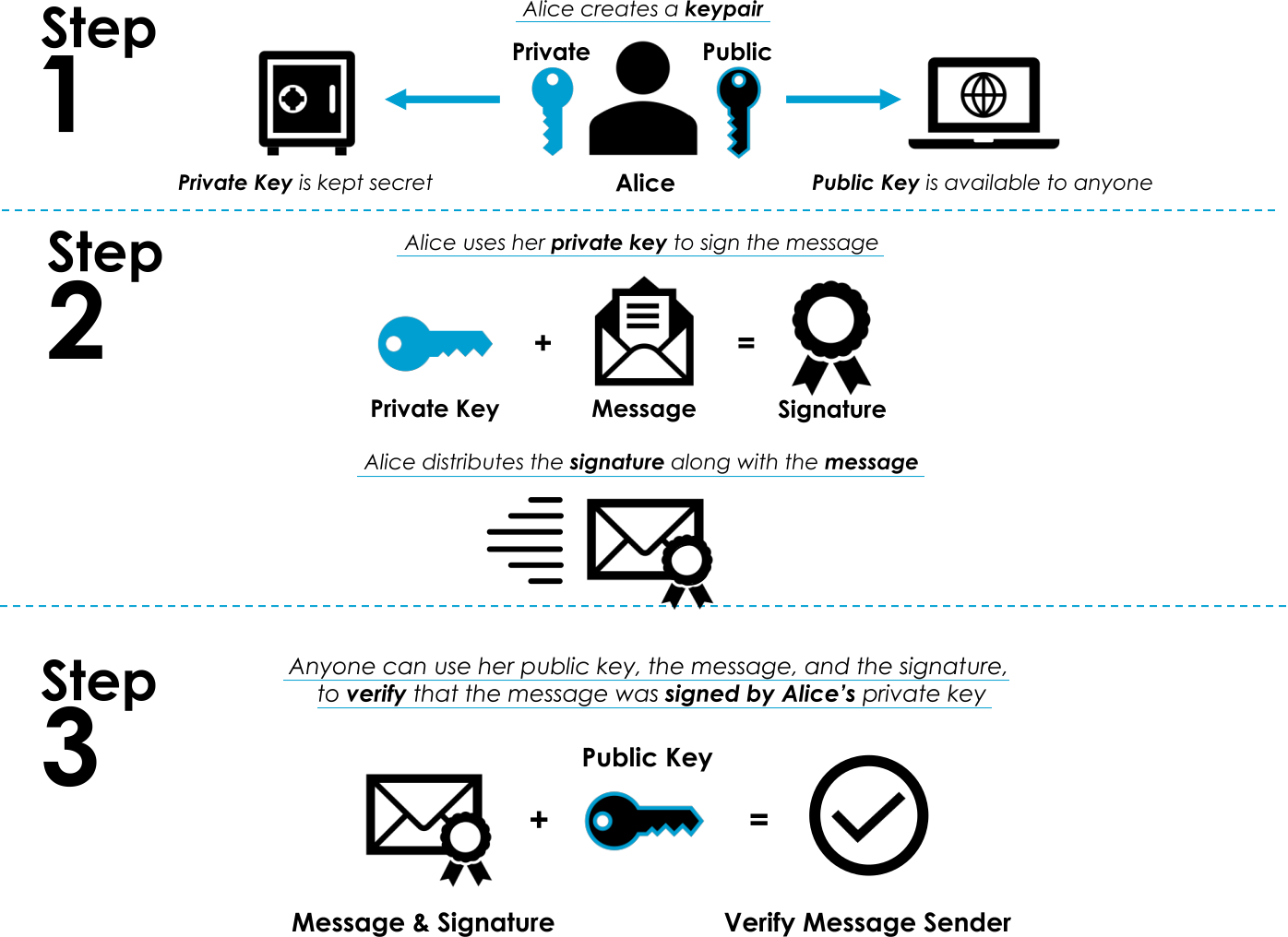
ML-DSA (Module-Lattice-Based Digital Signature Algorithm)
The library provides an implementation of ML-DSA as defined in NIST FIPS-204.
The cryptographic library implements both the "pure" and the "pre-hash" forms of ML-DSA.
ML-DSA comes in three variants:
-
IQR_MLDSA_44— NIST security level II -
IQR_MLDSA_65— NIST security level III -
IQR_MLDSA_87— NIST security level V
ML-DSA signing and verification operations must be performed using one of the three variants. The signature produced with one variant must be verified using the same variant. It would be an error to verify the signature using a different variant.
Creating Keys
Before the signing and the verification operations can be performed, a pair of public and private keys must be generated, as described in section "Digital Signature Usage".
The library lets you create ML-DSA keys after choosing the variant.
To create an ML-DSA key pair:
#include "iqr_context.h"
#include "iqr_mldsa.h"
#include "iqr_rng.h"
...
// Create an iqr_Context, context.
// Create and initialize a Random Number Generator, rng.
...
// Create ML-DSA parameters using one of the variants from iqr_mldsa.h.
iqr_MLDSA_Params *params = NULL;
iqr_retval result = iqr_MLDSA_CreateParams(context, variant, ¶ms);
if (result != IQR_OK) {
// Handle error.
}
// Create the key pair.
iqr_MLDSA_PublicKey *public_key = NULL;
iqr_MLDSA_PrivateKey *private_key = NULL;
uint8_t seed_buf[IQR_MLDSA_SEED_SIZE] = { 0 };
result = iqr_MLDSA_KeyGen(params, rng, &public_key, &private_key, seed_buf,
sizeof(seed_buf));
if (result != IQR_OK) {
// Handle error.
}seed_buf receives the random seed generated during the key generation
process. This seed, which is IQR_MLDSA_SEED_SIZE bytes in size, is a key
ingredient in creating the public-private key pair. It can be reused to
re-create the public-private key pair by using
iqr_MLDSA_ImportKeyPairFromSeed(). The seed must be kept secret. If you do
not want this function to output the seed, use NULL for this parameter.
Signing Messages Using Pure ML-DSA
Given an ML-DSA private key, once can sign a message to produce a digital signature.
The "pure" signing:
...
size_t signature_size = 0;
result = iqr_MLDSA_GetSignatureSize(params, &signature_size);
if (result != IQR_OK) {
    // Handle error.
}

uint8_t *signature = calloc(1, signature_size);
if (signature == NULL) {
    // Handle error.
}

bool is_deterministic = false;
const uint8_t ctx[] = "context string";
result = iqr_MLDSA_Sign(private_key, rng, is_deterministic, ctx, sizeof(ctx),
    message, message_size, signature, signature_size);
if (result != IQR_OK) {
    // Handle error.
}
ctx is the context string. It can be used by applications to create "domain
separation". For more information on context string, see
FIPS-204. If one does
not wish to use the context string, then use NULL for ctx and 0 for
ctx_size (which essentially makes the context string an empty string).
If is_deterministic is set to false, the signing operation uses "hedged
signing mode". Otherwise, "deterministic signing mode" is use. Hedged
signing mode adds fresh randomness to each signing operation, where as
deterministic signing mode does not. For more information on signing modes,
see FIPS-204.
Hedged signing mode should be used by default, and deterministic signing mode
should only be used if there is a clear need.
Verifying Signatures Using Pure ML-DSA
To verify a signature using the ML-DSA public key:
...
result = iqr_MLDSA_Verify(public_key, ctx, sizeof(ctx), message,
    message_size, signature, signature_size);
if (result != IQR_OK) {
    // Handle error.
}
ctx must be the same context string used when signing the message. If context
string was not used during signing (i.e., empty string), then use NULL for
ctx and 0 for ctx_size.
Note that verification will work to verify signatures produced under both the hedged signing mode and the deterministic signing mode.
Please see header file iqr_mldsa.h for more information on each parameter
of the signing and verification API.
Signing Messages Using Pre-hash ML-DSA
The "pure" form of ML-DSA described in the previous section is one of the two forms of ML-DSA defined in FIPS-204. The other form is "pre-hash".
The difference between "pure" and "pre-hash" is that "pre-hash" hashes the message first to produce a digest, and the digest is then signed. The "pure" form, on the other hand, does not perform such hashing, and the message is signed directly.
The "pre-hash" signing:
...
size_t signature_size = 0;
result = iqr_MLDSA_GetSignatureSize(params, &signature_size);
if (result != IQR_OK) {
    // Handle error.
}

uint8_t *signature = calloc(1, signature_size);
if (signature == NULL) {
    // Handle error.
}

iqr_HashAlgorithmType hash_algo = IQR_HASHALGO_SHA2_256;
bool is_deterministic = false;
const uint8_t ctx[] = "context string";
result = iqr_HashMLDSA_Sign(private_key, hash_algo, rng, is_deterministic,
    ctx, sizeof(ctx), message, message_size, signature, signature_size);
if (result != IQR_OK) {
    // Handle error.
}
The parameters are the same as in iqr_MLDSA_Sign(), except that there is
one more parameter hash_algo. This parameter specifies what hash algorithm
is used to hash the message. The message hashing operation is performed under
the hood of this API.
Our pre-hash implementation supports four hash algorithms:
| Hash Algorithm | Parameter Value |
|---|---|
|
|
|
|
|
|
|
|
|
|
You must select one of these four parameter values for hash_algo when using
pre-hash signing.
Verifying Signatures Using Pre-hash ML-DSA
The "pre-hash" form of ML-DSA is similar to the "pure" form, with differences explained in the pre-hash signing section.
The "pre-hash" verification:
...
result = iqr_HashMLDSA_Verify(public_key, hash_algo, ctx, sizeof(ctx),
    message, message_size, signature, signature_size);
if (result != IQR_OK) {
    // Handle error.
}
The value for the hash_algo parameter must be the same as the one used for
the corresponding pre-hash signing operation.
Managing Keys
To export ML-DSA keys for storage or transmission:
...
size_t public_key_data_size = 0;
result = iqr_MLDSA_GetPublicKeySize(params, &public_key_data_size);
if (result != IQR_OK) {
    // Handle error.
}

uint8_t *public_key_data = calloc(1, public_key_data_size);
if (public_key_data == NULL) {
    // Handle error.
}

result = iqr_MLDSA_GetPublicKeySize(public_key, public_key_data,
    public_key_data_size);
if (result != IQR_OK) {
    // Handle error.
}

size_t private_key_data_size = 0;
result = iqr_MLDSA_GetPrivateKeySize(params, &private_key_data_size);
if (result != IQR_OK) {
    // Handle error.
}

uint8_t *private_key_data = calloc(1, private_key_data_size);
if (private_key_data == NULL) {
    // Handle error.
}

result = iqr_MLDSA_ExportPrivateKey(private_key, private_key_data,
    private_key_data_size);
if (result != IQR_OK) {
    // Handle error.
}
To import ML-DSA keys from buffers:
...
// Create an iqr_MLDSA_Params object using the same variant that was used to
// create the keys.
...

iqr_MLDSA_PrivateKey *private_key = NULL;
result = iqr_MLDSA_ImportPrivateKey(params, private_key_data,
    private_key_data_size, &private_key);
if (result != IQR_OK) {
    // Handle error.
}

iqr_MLDSA_PublicKey *public_key = NULL;
result = iqr_MLDSA_ImportPublicKey(params, public_key_data,
    public_key_data_size, &public_key);
if (result != IQR_OK) {
    // Handle error.
}

// If you have the "seed" output from `iqr_MLDSA_KeyGen()`, you can also use
// it to recreate the key pair.
result = iqr_MLDSA_ImportKeyPairFromSeed(params, seed_buf, sizeof(seed_buf),
    &public_key, &private_key);
if (result != IQR_OK) {
    // Handle error.
}|
Note
|
The params used for importing keys must match the params used to create
the keys.
|
Public and Private Key Format
The public key data and the private key data produced by
iqr_MLDSA_ExportPublicKey() and iqr_MLDSA_ExportPrivateKey() are stored
in the format defined in
NIST FIPS-204.
To import public and private keys from data buffer, the key data stored in the data buffer must conform to the key format defined in NIST FIPS-204.
Signature Format
The signature data produced by iqr_MLDSA_Sign() conforms to the format
defined in
NIST FIPS-204.
LMS and XMSS Tree Strategies
Tree strategies offer a trade-off between CPU utilization and memory usage during signing. Choosing the correct strategy is highly dependent on the hardware restrictions of the target platform.
FULL_TREE_STRATEGY-
The Full Tree strategy keeps the entire Merkle tree in memory. This strategy uses the least CPU at the cost of using memory. This option is ideal for servers with large amounts of memory and the need to generate signatures frequently.
LOW_MEMORY_STRATEGY-
The Low Memory strategy implements an algorithm that minimizes the memory/storage requirements of the state at the cost of recomputing parts of the tree during signing. This option is ideal for memory constrained devices with a fast CPU to handle the extra computation.
VERIFY_ONLY_STRATEGY-
The Verify strategy is only used to verify signatures; it cannot be used to create or import private keys nor can it be used to create signatures. This option is ideal for a client that only needs to verify signatures. It uses the least CPU and RAM.
LMS and XMSS States
The LMS and XMSS algorithms are stateful hash-based signatures.
Their private key must be accompanied by a state that gets updated every
time you perform a Sign() operation to generate a signature.
The size (and contents) of the state depend on height and the tree strategy chosen when generating keys. See the Technical Information section for more information.
Each time the Sign() function is called, the state is advanced to the next
usable state. You must store this new state in non-volatile memory prior to
releasing the signature.
Use the CreateSigningState() function to create a state used for signing.
This effectively "reserves" a number of signatures. After creating a signing
state, you must export the storage state with ExportStorageState() and save
it to non-volatile memory, then call ConfirmStorageStateCommitted() to verify
that the state has been properly stored. When the storage state has run out of
signatures, destroy the storage state with DestroyStorageState() then confirm
that you’ve destroyed it using ConfirmStorageStateWiped().
This is required for disaster recovery. You can create a small signing state and use it while the rest of the state is persisted in non-volatile memory. In the event of a power outage, the persisted state will not issue signatures that overlap with the state lost in volatile memory.
|
Important
|
Using ExportStorageState() to move private data from one signing device to
another violates the constraints defined by
NIST SP 800-208.
The resulting storage state must not leave the signing hardware.
|
Use GetSignatureCount() to obtain the number
of available signatures. Use GetStorageStateSize() to obtain the state
sizes prior to exporting.
LMS (Leighton-Micali Signature) Scheme
The library provides an implementation of the Leighton-Micali Signature (LMS) scheme as defined in NIST SP 800-208.
LMS is a signature scheme that has several major differences from classical digital signature schemes:
-
An LMS private key can only be used to sign a finite number of items.
-
You need to carefully maintain the storage state.
The variant can be one of:
-
IQR_LMS_2E5— 25 (32) one-time signatures -
IQR_LMS_2E10— 210 (1024) one-time signatures -
IQR_LMS_2E15_FAST— 215 (32,768) one-time signatures, producing larger signatures in less time -
IQR_LMS_2E15_SMALL— 215 (32,768) one-time signatures, producing smaller signatures in more time
These variants correspond to the following parameters from the RFC:
| Variant | Height | Winternitz |
|---|---|---|
|
5 |
4 |
|
10 |
4 |
|
15 |
2 |
|
15 |
8 |
It’s up to the user to manage domain parameters.
The size of the LMS state varies depending on the variant and tree strategy used; see the Technical Information section for key and state sizes. LMS signature size is relative to the full tree height and Winternitz value.
Creating Keys
The library lets you create LMS keys by specifying the variant.
To create an LMS key pair:
#include "iqr_context.h"
#include "iqr_hash.h"
#include "iqr_lms.h"
#include "iqr_rng.h"
...
// Create an iqr_Context, context.
// Register a SHA2-256 hash algorithm.
// Create and initialize a Random Number Generator, rng.
...
// Create LMS parameters.
iqr_LMSParams *params = NULL;
iqr_retval result = iqr_LMSCreateParams(context,
&IQR_LMS_FULL_TREE_STRATEGY, IQR_LMS_2E15_FAST, ¶ms);
if (result != IQR_OK) {
// Handle error.
}
// Create the key pair.
iqr_LMSPublicKey *public_key = NULL;
iqr_LMSPrivateKey *private_key = NULL;
iqr_LMSStorageState *storage_state = NULL;
result = iqr_LMSCreateKeyPair(params, rng, &public_key, &private_key,
&storage_state);
if (result != IQR_OK) {
// Handle error.
}Signing
To sign a message using the LMS private key, you must create a signing state. This reduces the size of the storage state, which must be stored to non-volatile memory before performing the signing operation. If creating the signing state exhausts the storage state, you must destroy the storage state before performing the signing operation:
...
iqr_LMSSigningState *signing_state = NULL;
bool storage_state_depleted = false;
result = iqr_LMSCreateSigningState(private_key, storage_state, 1,
    &signing_state, &storage_state_depleted);
if (result != IQR_OK) {
    // Handle error.
}

/*********************** CRITICALLY IMPORTANT STEP *************************

  You must save the storage state to non-volatile memory before using the
  newly created signing state. Failure to do so could result in a security
  breach as it could lead to the re-use of a one-time signature.

  For more information about this property of the LMS state, please refer
  to the LMS specification.

 **************************************************************************/

size_t export_state_size = 0;
result = iqr_LMSGetStorageStateSize(params, &export_state_size);
if (result != IQR_OK) {
    // Handle error.
}

if (storage_state_depleted == true) {
    /* Remove the state file from non-volatile storage. */
    ...

    /* Remember, do not skip the wipe step and "cheat". If the state isn't
     * properly wiped there is a risk of undermining your security.
     */
    result = iqr_LMSConfirmStorageStateWiped(storage_state, signing_state);
    if (result != IQR_OK) {
        // Handle error.
    }
} else {
    uint8_t *export_state = calloc(1, export_state_size);
    if (export_state == NULL) {
        // Handle error.
    }

    result = iqr_LMSExportStorageState(storage_state, export_state,
        export_state_size);
    if (result != IQR_OK) {
        // Handle error.
    }

    /* Save the updated state. */
    ...

    /* Remember, do not skip the save step and "cheat". If the state isn't
     * properly saved there is a risk of undermining your security.
     */
    result = iqr_LMSConfirmStorageStateCommitted(storage_state, signing_state);
    if (result != IQR_OK) {
        // Handle error.
    }
}

/* Determine the size of the resulting signature and allocate memory. */
result = iqr_LMSGetSignatureSize(params, &signature_size);
if (result != IQR_OK) {
    // Handle error.
}

uint8_t *signature = calloc(1, signature_size);
if (signature == NULL) {
    // Handle error.
}

result = iqr_LMSSign(private_key, message, message_size,
    signing_state, signature, signature_size);
if (result != IQR_OK) {
    // Handle error.
}
Verifying Signatures
To verify a signature using the LMS public key:
...
result = iqr_LMSVerify(public_key, message, message_size, signature,
    signature_size);
if (result != IQR_OK) {
    // Handle error.
}
Managing Keys
To export LMS keys and storage state for storage or transmission:
...
size_t public_key_data_size = 0;
result = iqr_LMSGetPublicKeySize(params, &public_key_data_size);
if (result != IQR_OK) {
    // Handle error.
}

uint8_t *public_key_data = calloc(1, public_key_data_size);
if (public_key_data == NULL) {
    // Handle error.
}

result = iqr_LMSExportPublicKey(public_key, public_key_data,
    public_key_data_size);
if (result != IQR_OK) {
    // Handle error.
}

size_t private_key_data_size = 0;
result = iqr_LMSGetPrivateKeySize(params, &private_key_data_size);
if (result != IQR_OK) {
    // Handle error.
}

uint8_t *private_key_data = calloc(1, private_key_data_size);
if (private_key_data == NULL) {
    // Handle error.
}

result = iqr_LMSExportPrivateKey(private_key, private_key_data,
    private_key_data_size);
if (result != IQR_OK) {
    // Handle error.
}

size_t state_size = 0;
result = iqr_LMSGetStorageStateSize(params, &state_size);
if (result != IQR_OK) {
    // Handle error.
}

uint8_t *state_data = calloc(1, state_size);
if (state_data == NULL) {
    // Handle error.
}

result = iqr_LMSExportStorageState(state, state_data, state_size);
if (result != IQR_OK) {
    // Handle error.
}
To import LMS keys and storage state from buffers:
...
// Create an iqr_LMSParams object using the same parameters that were used
// to create the keys.
...

iqr_LMSPublicKey *public_key = NULL;
result = iqr_LMSImportPublicKey(params, public_key_data, public_key_data_size,
    &public_key);
if (result != IQR_OK) {
    // Handle error.
}

iqr_LMSPrivateKey *private_key = NULL;
result = iqr_LMSImportPrivateKey(params, private_key_data,
    private_key_data_size, &private_key);
if (result != IQR_OK) {
    // Handle error.
}

iqr_LMSPrivateKeyState *state = NULL;
result = iqr_LMSImportStorageState(params, state_data, state_data_size, &state);
if (result != IQR_OK) {
    // Handle error.
}|
Note
|
The params used for importing keys must match the params used to create
the keys.
|
Public Key Format
LMS public keys are stored in the format defined in NIST SP 800-208.
Signature Format
LMS signatures are stored in the format defined in NIST SP 800-208.
XMSS (eXtended Merkle Signature Scheme)
The library provides an implementation of the eXtended Merkle Signature Scheme (XMSS) as defined in NIST SP 800-208.
XMSS is a one-time signature scheme that has several major differences from classical digital signature schemes:
-
An XMSS private key can only be used to sign a finite number of items.
-
You need to carefully maintain the storage state.
When you create an XMSS key pair, you specify the variant (iqr_XMSSVariant)
parameter, which specifies the tree height. The height controls the number of
one-time signatures available in the private key. The variant can be one of:
-
IQR_XMSS_2E10— 210 (1024) one-time signatures -
IQR_XMSS_2E16— 216 (65,536) one-time signatures
It’s up to the user to manage domain parameters.
The storage state tracks the one-time signature tree state. Re-using a one-time signature destroys the security of the scheme, so be careful to:
-
Not re-use a state when signing.
-
Safely and securely save your storage state before creating a signature to protect against software crashes or power loss.
XMSS storage state is larger depending on the tree height; see the Technical Information section for sizes. XMSS signatures grow relative to the full tree height.
Creating Keys
The library lets you create XMSS keys by specifying individual parameters.
To create an XMSS key pair:
#include "iqr_context.h"
#include "iqr_hash.h"
#include "iqr_rng.h"
#include "iqr_xmss.h"
...
// Create an iqr_Context, context.
// Register a SHA2-256 hash algorithm.
// Create and initialize a Random Number Generator, rng.
...
// Create XMSS parameters.
iqr_XMSSParams *params = NULL;
iqr_retval result = iqr_XMSSCreateParams(context, &IQR_XMSS_FULL_TREE_STRATEGY,
variant, ¶ms);
if (result != IQR_OK) {
// Handle error.
}
// Create the key pair.
iqr_XMSSPublicKey *public_key = NULL;
iqr_XMSSPrivateKey *private_key = NULL;
iqr_XMSSStorageState *storage_state = NULL;
result = iqr_XMSSCreateKeyPair(params, rng, &public_key, &private_key,
&storage_state);
if (result != IQR_OK) {
// Handle error.
}Signing
To sign a message using the XMSS private key, you must create a signing state. This reduces the size of the storage state, which must be stored to non-volatile memory before performing the signing operation. If creating the signing state exhausts the storage state, you must destroy the storage state before performing the signing operation:
...
iqr_XMSSSigningState *signing_state = NULL;
bool storage_state_depleted = false;

result = iqr_XMSSCreateSigningState(private_key, storage_state, 1,
    &signing_state, &storage_state_depleted);
if (result != IQR_OK) {
    // Handle error.
}

/*********************** CRITICALLY IMPORTANT STEP *************************

  You must save the storage state to non-volatile memory before using the
  newly created signing state. Failure to do so could result in a security
  breach as it could lead to the re-use of a one-time signature.

  For more information about this property of the XMSS state, please refer
  to the XMSS specification.

 **************************************************************************/

if (storage_state_depleted == true) {
    /* Remove the state from non-volatile storage. */
    ...

    /* Remember, do not skip the wipe step and "cheat". If the state isn't
     * properly wiped there is a risk of undermining your security.
     */
    result = iqr_XMSSConfirmStorageStateWiped(storage_state, signing_state);
    if (result != IQR_OK) {
        // Handle error.
    }
} else {
    size_t export_state_size = 0;
    result = iqr_XMSSGetStorageStateSize(params, &export_state_size);
    if (result != IQR_OK) {
        // Handle error.
    }

    uint8_t *export_state = calloc(1, export_state_size);
    if (export_state == NULL) {
        // Handle error.
    }

    result = iqr_XMSSExportStorageState(storage_state, export_state,
        export_state_size);
    if (result != IQR_OK) {
        // Handle error.
    }

    /* Save the updated state. */
    ...

    /* Remember, do not skip the save step and "cheat". If the state isn't
     * properly saved there is a risk of undermining your security.
     */
    result = iqr_XMSSConfirmStorageStateCommitted(storage_state, signing_state);
    if (result != IQR_OK) {
        // Handle error.
    }
}

/* Determine the size of the resulting signature and allocate memory. */
result = iqr_XMSSGetSignatureSize(params, &signature_size);
if (result != IQR_OK) {
    // Handle error.
}

uint8_t *signature = calloc(1, sig_size);
if (signature == NULL) {
    // Handle error.
}

result = iqr_XMSSSign(priv, message, message_size, signing_state,
    signature, signature_size);
if (result != IQR_OK) {
    // Handle error.
}
Verifying Signatures
To verify a signature using the XMSS public key:
...
result = iqr_XMSSVerify(public_key, message, message_size, signature,
    signature_size);
if (result != IQR_OK) {
    // Handle error.
}
Managing Keys
To export XMSS keys and storage stage for storage or transmission:
...
size_t public_key_data_size = 0;
result = iqr_XMSSGetPublicKeySize(params, &public_key_data_size);
if (result != IQR_OK) {
    // Handle error.
}

uint8_t *public_key_data = calloc(1, public_key_data_size);
if (public_key_data == NULL) {
    // Handle error.
}

result = iqr_XMSSExportPublicKey(public_key, public_key_data,
    public_key_data_size);
if (result != IQR_OK) {
    // Handle error.
}

size_t private_key_data_size = 0;
result = iqr_XMSSGetPrivateKeySize(params, &private_key_data_size);
if (result != IQR_OK) {
    // Handle error.
}

uint8_t *private_key_data = calloc(1, private_key_data_size);
if (private_key_data == NULL) {
    // Handle error.
}

result = iqr_XMSSExportPrivateKey(private_key, private_key_data,
    private_key_data_size);
if (result != IQR_OK) {
    // Handle error.
}

size_t state_size = 0;
result = iqr_XMSSGetStorageStateSize(params, &state_size);
if (result != IQR_OK) {
    // Handle error.
}

uint8_t *state_data = calloc(1, state_size);
if (state_data == NULL) {
    // Handle error.
}

result = iqr_XMSSExportStorageState(state, state_data, state_size);
if (result != IQR_OK) {
    // Handle error.
}
To import XMSS keys and storage state from buffers:
...
// Create an iqr_XMSSParams object using the same parameters that were used
// to create the keys.
...

iqr_XMSSPublicKey *public_key = NULL;
result = iqr_XMSSImportPublicKey(params, public_key_data, public_key_data_size,
    &public_key);
if (result != IQR_OK) {
    // Handle error.
}

iqr_XMSSPrivateKey *private_key = NULL;
result = iqr_XMSSImportPrivateKey(params, private_key_data,
    private_key_data_size, &private_key);
if (result != IQR_OK) {
    // Handle error.
}

iqr_XMSSStorageState *state = NULL;
result = iqr_XMSSImportStorageState(params, state_data, state_data_size,
    &state);
if (result != IQR_OK) {
    // Handle error.
}|
Note
|
The params used for importing keys must match the params used to create
the keys.
|
Public Key Format
XMSS public keys are stored in the format defined in NIST SP 800-208.
Supported oid values for the library match these values from section 8 of the
NIST document:
-
XMSS-SHA2_10_256 -
XMSS-SHA2_16_256
Signature Format
XMSS public keys are stored in the format defined in NIST SP 800-208.
Key Encapsulation Mechanisms
The library provides these Key Encapsulation Mechanisms (KEMs):
-
ML-KEM — Module-Lattice-Based Key Encapsulation Mechanism
These schemes generate and cryptographically encapsulate a shared secret key for safe transmission. They work similar to public key encryption schemes.
Key Encapsulation Mechanism Usage
-
Alice generates an encapsulation and decapsulation key pair (which is similar to a public and private key pair).
-
Alice makes her encapsulation key available to everyone.
-
Alice keeps her decapsulation key secret.
-
-
Bob generates a shared secret key and uses Alice’s encapsulation key to encapsulate it as a ciphertext.
-
Bob sends the ciphertext back to Alice.
-
-
Alice uses her decapsulation key and the ciphertext to decapsulate the shared secret key.
-
When they’re done, both Alice and Bob have the same shared secret key.
-
-
Alice and Bob can use the shared secret key for symmetric encryption (for example).
Depending on your protocol, you might also feed the shared secret key to a Key Derivation Function to get a shared symmetric key.
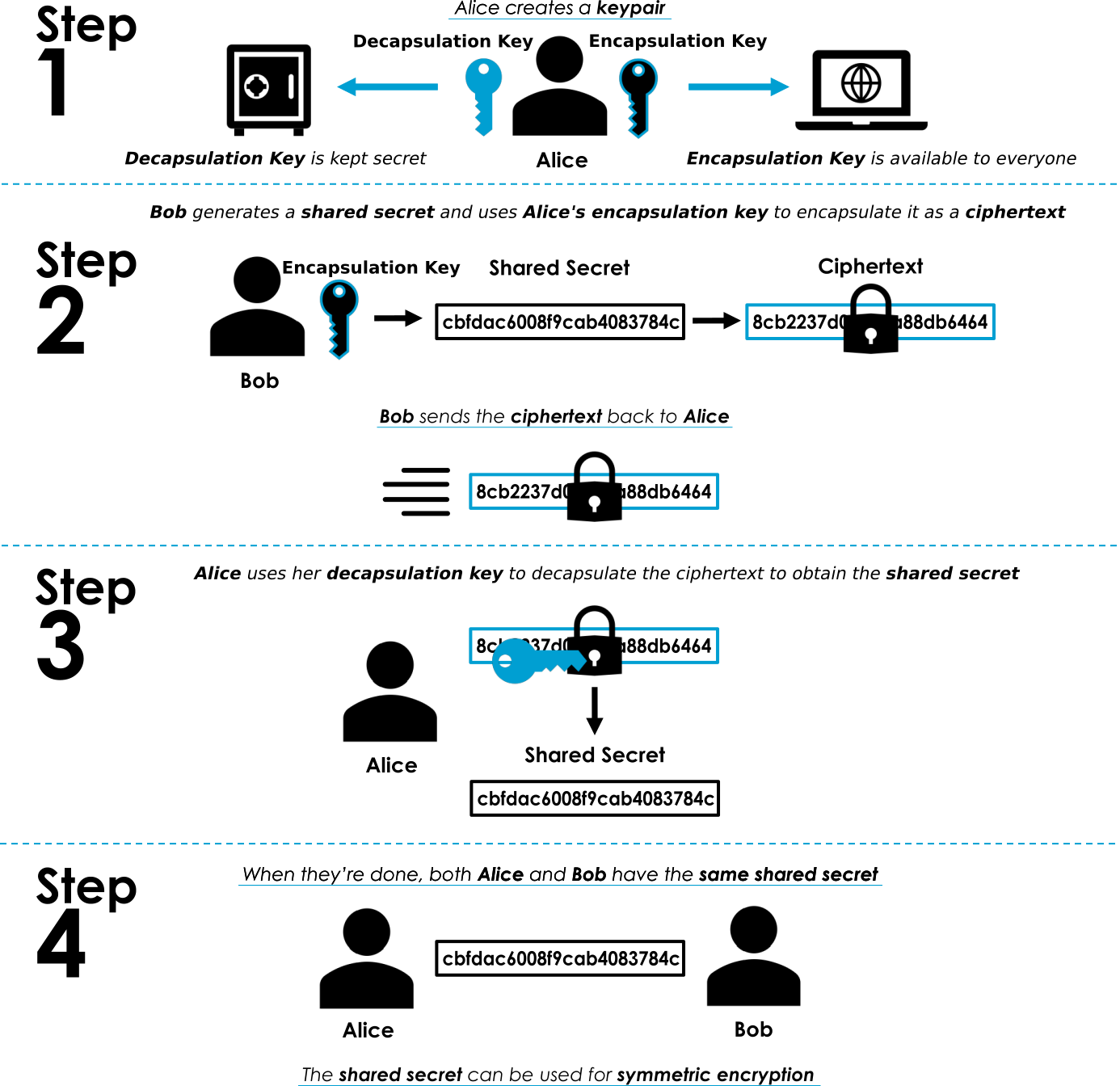
|
Note
|
If your protocol requires perfect forward secrecy, you must treat KEM decapsulation keys as ephemeral keys; don’t re-use them. |
ML-KEM (Module-Lattice-Based Key-Encapsulation Mechanism)
The library provides the following variants of ML-KEM:
-
IQR_MLKEM_512— NIST security level I -
IQR_MLKEM_768— NIST security level III -
IQR_MLKEM_1024— NIST security level V
ML-KEM encapsulation and decapsulation operations must be performed using one of the three variants.
Creating Keys
Before the encapsulation and the decapsulation operations can be performed, a pair of encapsulation and decapsulation keys must be generated.
The key generation API:
iqr_retval iqr_MLKEM_KeyGen(
    const iqr_MLKEM_Params *params,
    const iqr_RNG *rng,
    iqr_MLKEM_EncapKey **encap_key,
    iqr_MLKEM_DecapKey **decap_key,
    uint8_t *seed_buf, size_t seed_buf_size);
seed_buf receives the random seed generated during the key generation
process. This seed, which is IQR_MLKEM_SEED_SIZE bytes in size, is a key
ingredient in creating the encap-decap key pair. It can be reused to
re-create the encap-decap key pair by using
iqr_MLKEM_ImportKeyPairFromSeed(). The seed must be kept secret. If you do
not want this function to output the seed, use NULL for this parameter.
Please see header file iqr_mlkem.h for explanation on this API and on
each of its parameters, as well as a number of useful key utility functions.
For instance, to create a key pair:
#include "iqr_context.h"
#include "iqr_mlkem.h"
...
// Create an iqr_Context, context.
// Create and initialize a Random Number Generator, rng.
// See 'iqr_mlkem.h' for rng security requirement.
...
// The variant can be IQR_MLKEM_512, IQR_MLKEM_768, or IQR_MLKEM_1024.
iqr_MLKEM_Params *params = NULL;
iqr_retval result = iqr_MLKEM_CreateParams(context, variant, ¶ms);
if (result != IQR_OK) {
// Handle error.
}
iqr_MLKEM_EncapKey *encap_key = NULL;
iqr_MLKEM_DecapKey *decap_key = NULL;
result = iqr_MLKEM_KeyGen(params, rng, &encap_key, &decap_key, NULL, 0);
if (result != IQR_OK) {
// Handle error.
}
// The generated encapsulation and decapsulation keys can now be used for
// encapsulation and decapsulation operations.
// Export the encapsulation key to a byte buffer in FIPS-203 compliant
// format.
size_t encap_key_size = 0;
result = iqr_MLKEM_GetEncapKeySize(params, &encap_key_size);
if (result != IQR_OK) {
// Handle error.
}
uint8_t *encap_key_buffer = calloc(1, encap_key_size);
if (encap_key_buffer == NULL) {
// Handle error.
}
result = iqr_MLKEM_ExportEncapKey(encap_key, encap_key_buffer,
encap_key_size);
if (result != IQR_OK) {
// Handle error.
}
result = iqr_MLKEM_DestroyEncapKey(&encap_key);
if (result != IQR_OK) {
// Handle error.
}
// The exported encapsulation key stored in encap_key_buffer can now be sent
// to other peers.
// Import an encapsulation key to be used for the encapsulation operation.
iqr_MLKEM_EncapKey *imported_encap_key = NULL;
result = iqr_MLKEM_ImportEncapKey(params, encap_key_buffer, encap_key_size,
&imported_encap_key);
if (result != IQR_OK) {
// Handle error.
}
// Similar key export and import operations can be performed on the
// decapsulation key as well. See 'iqr_mlkem.h' for more information on
// key utility functions.
...Encapsulating the Secret
Given an ML-KEM encapsulation key, one can create a shared secret key and the corresponding ciphertext which is an encapsulation (encryption) of the said shared secret key using the encapsulation function.
The encapsulation API:
iqr_retval iqr_MLKEM_Encapsulate(
    const iqr_MLKEM_EncapKey *encap_key,
    const iqr_RNG *rng,
    uint8_t *shared_secret_key, size_t shared_secret_key_size,
    uint8_t *ciphertext, size_t ciphertext_size);
Please see header file iqr_mlkem.h for explanation on this API and on
each of its parameters.
#include "iqr_mlkem.h"
...
// Create and initialize a Random Number Generator, rng.
// See 'iqr_mlkem.h' for rng security requirement.
...

// Generate a shared secret key and encapsulate it into a ciphertext.
uint8_t *shared_secret_key = calloc(1, IQR_MLKEM_SHARED_SECRET_KEY_SIZE);
if (shared_secret_key == NULL) {
    // Handle error.
}

size_t ciphertext_size = 0;
result = iqr_MLKEM_GetCiphertextSize(params, &ciphertext_size);
if (result != IQR_OK) {
    // Handle error.
}

uint8_t *ciphertext = calloc(1, ciphertext_size);
if (ciphertext == NULL) {
    // Handle error.
}

result = iqr_MLKEM_Encapsulate(encap_key, rng, shared_secret_key,
    IQR_MLKEM_SHARED_SECRET_KEY_SIZE, ciphertext, ciphertext_size);
if (result != IQR_OK) {
    // Handle error.
}

// The ciphertext can now be sent to the peer.
...
Decapsulating the Secret
The decapsulation API:
iqr_retval iqr_MLKEM_Decapsulate(
    const iqr_MLKEM_DecapKey *decap_key,
    const uint8_t *ciphertext, size_t ciphertext_size,
    uint8_t *shared_secret_key, size_t shared_secret_key_size);
Please see header file iqr_mlkem.h for explanation on this API and on
each of its parameters.
To decapsulate the shared secret key using the decapsulation key:
#include "iqr_mlkem.h"
...
// Get the ciphertext from the peer.
...

size_t ciphertext_size = 0;
result = iqr_MLKEM_GetCiphertextSize(params, &ciphertext_size);
if (result != IQR_OK) {
    // Handle error.
}

if (ciphertext_size != received_ciphertext_size) {
    // Handle error.
}

uint8_t *shared_secret_key = calloc(1, IQR_MLKEM_SHARED_SECRET_KEY_SIZE);
if (shared_secret_key == NULL) {
    // Handle error.
}

result = iqr_MLKEM_Decapsulate(private_key, ciphertext, ciphertext_size,
    shared_secret_key, IQR_MLKEM_SHARED_SECRET_KEY_SIZE);
if (result != IQR_OK) {
    // Handle error.
}
...|
Note
|
The params used for the same set of key generation, encapsulation and
decapsulation operations must be created with the same ML-KEM variant.
|
Encapsulation and Decapsulation Key Format
The encapsulation key data and the decapsulation key data produced by
iqr_MLKEM_ExportEncapKey() and iqr_MLKEM_ExportDecapKey() are stored
in the format defined in
NIST FIPS-203.
To import encapsulation and decapsulation keys from data buffer, the key data stored in the data buffer must conform to the key format defined in NIST FIPS-203.
Shared Secret Key and Ciphertext Format
The shared secret key and ciphertext data produced by
iqr_MLKEM_Encapsulate() conforms to the format defined in
NIST FIPS-203.
Technical Information
This section provides further information about some technical aspects of the library.
Security Strength
Section 4 of the NIST Call for Proposals (CFP) for Post-Quantum Cryptography describes these requirements for security:
-
KEMs that satisfy IND-CCA2 ("Indistinguishable under adaptive chosen ciphertext attack") security can be safely used with static keys (up to 264 times).
-
KEMs that satisfy IND-CPA ("Indistinguishable under chosen plaintext attack") security can only be used with entirely ephemeral keys.
-
Digital signatures must satisfy EUF-CMA ("Existential Unforgeability under Chosen Message Attack") security (for up to 264 messages).
The CFP defines five security strength categories:
-
I - Equivalent to finding the key for a block cipher with a 128-bit key (AES128).
-
II - Equivalent to finding a collision in a 256-bit hash function (SHA2-256, SHA3-256).
-
III - Equivalent to finding the key for a block cipher with a 192-bit key (AES192).
-
IV - Equivalent to finding a collision in a 384-bit hash function (SHA2-384, SHA3-384).
-
V - Equivalent to finding the key for a block cipher with a 256-bit key (AES256).
You can find more detailed information about these ratings in the CFP document.
KEM Security
The library’s KEMs support various security strengths depending on their variants:
| Algorithm | Variant | Strength |
|---|---|---|
ML-KEM |
|
I |
|
III |
|
|
V |
|
Note
|
KEMs all provide IND-CCA2 security, and are safe to use with static keys. |
Signature Scheme Security
The library’s NIST signature schemes support various security strengths depending on their variants:
| Algorithm | Variant | Strength |
|---|---|---|
ML-DSA |
|
II |
|
III |
|
|
V |
The stateful hash-based signature schemes (LMS and XMSS) have security equivalent to their underlying hash function, SHA2-256. This is equivalent to NIST’s II security category.
Key and Data Sizes
Digital signature schemes:
Key encapsulation mechanisms:
|
Note
|
These sizes are provided as a reference only; use the various iqr_*Get*Size()
functions to find the correct sizes at run-time.
|
ML-DSA Keys and Signatures
ML-DSA digital signature scheme key and signature sizes:
| Variant | Public Key (bytes) | Private Key (bytes) | Signature (bytes) |
|---|---|---|---|
|
1,312 |
2,560 |
2,420 |
|
1,952 |
4,032 |
3,309 |
|
2,592 |
4,896 |
4,627 |
LMS Keys and Signatures
LMS digital signature scheme key and signature sizes:
| Variant | Public Key (bytes) | Private Key (bytes) | Low Memory State (bytes) | Full Tree State (bytes) | Signature (bytes) |
|---|---|---|---|---|---|
|
56 |
128 |
727 |
2,032 |
2,348 |
|
56 |
128 |
1,601 |
65,520 |
2,508 |
|
56 |
128 |
2,739 |
2,097,136 |
4,780 |
|
56 |
128 |
2,739 |
2,097,136 |
1,612 |
The tree strategy has no effect on LMS key or signature sizes.
XMSS Keys and Signatures
XMSS digital signature scheme key and signature sizes:
| Variant | Public Key (bytes) | Private Key (bytes) | Low Memory State (bytes) | Full Tree State (bytes) | Signature (bytes) |
|---|---|---|---|---|---|
|
68 |
140 |
1,601 |
65,520 |
2,500 |
|
68 |
140 |
2,417 |
4,194,288 |
2,692 |
The tree strategy has no effect on XMSS key or signature sizes.
ML-KEM Keys, Ciphertext, and Shared Secret Keys
ML-KEM key, ciphertext, and shared secret key sizes:
| Variant | Encapsulation Key (bytes) | Decapsulation Key (bytes) | Ciphertext (bytes) | Shared Secret key (bytes) |
|---|---|---|---|---|
|
800 |
1,632 |
768 |
32 |
|
1,184 |
2,400 |
1,088 |
32 |
|
1,568 |
3,168 |
1,568 |
32 |
Build Options
During development of the library, builds use many compiler and linker flags intended to help reduce errors and improve overall code quality.
The library libraries are generally built using the "native" compiler (clang
or gcc) for a platform:
| Platform | Compiler |
|---|---|
Linux |
|
macOS |
|
Windows |
|
FreeBSD |
|
Compiler Options
When building with clang:
-
-Weverything-Wno-deprecated-Wno-deprecated-declarations-Wno-vla-Wno-packed-Wno-padded-Wno-disabled-macro-expansion-Wno-documentation-unknown-command-Wno-missing-field-initializers-Werror -
-Winline -
-Wno-reserved-id-macro(for everything except FreeBSD) -
-fno-stack-protector-fvisibility=hidden-fPIC -
-std=c99 -
-O3 -
-DNDEBUG-D_FORTIFY_SOURCE=2 -
-D__USE_MINGW_ANSI_STDIO=1(Windows only)
When building with gcc:
-
-Wall-Wextra-Waggregate-return-Wbad-function-cast-Wcast-align-Wcast-qual-Wfloat-equal-Wformat-security-Wformat=2-Winit-self-Wmissing-include-dirs-Wmissing-noreturn-Wmissing-prototypes-Wnested-externs-Wno-deprecated-Wno-deprecated-delcarations-Wold-style-definition-Wpedantic-Wredundant-decls-Wshadow-Wstrict-prototypes-Wswitch-default-Wuninitialized-Wunreachable-code-Wunused-Wvarargs-Wwrite-strings-Werror -
-Winline -
-fstrict-aliasing-fstrict-overflow-funsafe-loop-optimizations-ffunction-sections-fno-stack-protector-fno-dse-fPIC -
-pedantic -
-pipe -
-std=c99 -
-O3 -
-DNDEBUG-D_FORTIFY_SOURCE=2 -
-D__USE_MINGW_ANSI_STDIO=1(Windows only)
Linker Options
When building with clang:
-
-Wl,-undefined,error(for macOS) or-Wl,--no-undefined(others) -
-Wl,-unexported_symbol,_isc*and-Wl,-unexported_symbol,_ISC*(for macOS)
When building with gcc:
-
-Wl,-dead_strip(for macOS) or-Wl,--gc-sections(others) -
-Wl,-undefined,error(for macOS) or-Wl,--no-undefined(others) -
-Wl,-unexported_symbol,_isc*and-Wl,-unexported_symbol,_ISC*(for macOS)
Apple Bitcode
The library does not support Apple’s Bitcode for iOS, tvOS, or watchOS binaries. For security reasons, the library needs fine control over optimizations and the life cycle of memory buffers, which isn’t possible when producing Bitcode.
Code Stripping
The library has been designed to maximize code stripping to help when deploying to embedded systems. This is the reasoning behind having no pre-registered default for the hash algorithms. If you provide your own implementation, or only use a subset of the library’s implementations, your executable won’t include the unused library code.
Internally, algorithms with variants (such as ML-DSA) use the same technique to include only the code required to implement the specific variants you use in your applications.
If your compiler/linker supports it, use the -flto option to enable full
link-time optimization.
Linux libc
The Linux version of the library is built and tested against the following
versions of the libc library:
-
2.23 (Ubuntu, 64 bit)
-
2.24 (Arch, 64 bit)
-
2.24 (Raspbian, 32 bit)
The Linux-musl version of the library is built and tested against musl in
Alpine Linux 64-bit.
Building on Windows
When building an application that links against the static library
(libiqrcrypto_static.lib), add the library under Linker > Input >
Additional Dependencies in Visual Studio. No other changes to your Solution
file are necessary.
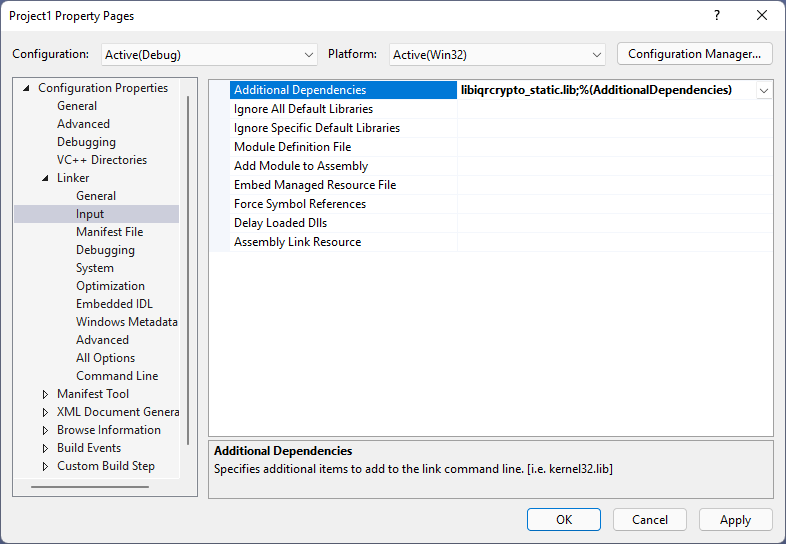
When linking dynamically, you must specify the import library
(libiqrcrypto.lib) under Linker > Input > Additional Dependencies.
Additionally, you must add IQR_DLL to the preprocessor listing under C/C++ >
Preprocessor > Preprocessor Definitions. This will ensure that extern symbols
are imported correctly. The library DLL (libiqrcrypto.dll) must reside in a
location where it can be found by the linker.
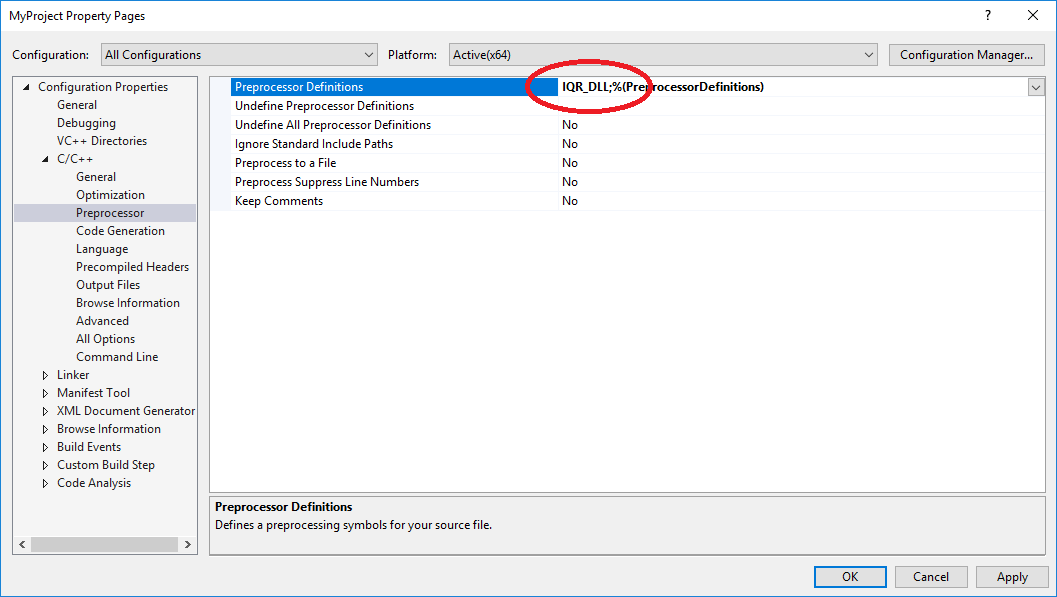
Legal
The ISARA Radiate Quantum-Safe Library is licensed for use:
Copyright © 2015-2026, ISARA Corporation, All Rights Reserved.
The code and other content set out herein is not in the public domain, is considered a trade secret and is confidential to ISARA Corporation. Use, reproduction or distribution, in whole or in part, of such code or other content is strictly prohibited except by express written permission of ISARA Corporation. Please contact ISARA Corporation at info@isara.com for more information.
Please refer to your sales/support contract for more information about technical support and upgrade entitlements.
Trademarks
ISARA Radiate™ is a trademark of ISARA Corporation.
Sample Code License
Sample code (and only the sample code) is covered by the Apache 2.0 license:
Licensed under the Apache License, Version 2.0 (the "License"); you may not use this file except in compliance with the License. You may obtain a copy of the License at
Unless required by applicable law or agreed to in writing, software distributed under the License is distributed on an "AS IS" BASIS, WITHOUT WARRANTIES OR CONDITIONS OF ANY KIND, either express or implied. See the License for the specific language governing permissions and limitations under the License.
Patent Information
Portions of this software are covered by US Patents 9,614,668, 9,673,977, 9,698,986, 9,780,948, 9,912,479, 9,942,039, 9,942,040, 10,031,795, 10,061,636, 10,097,351, 10,103,886, 10,116,443, 10,116,450, 10,218,494, 10,218,504, 10,313,124, 10,404,458, 10,425,401, 10,454,681, and 10,581,616.